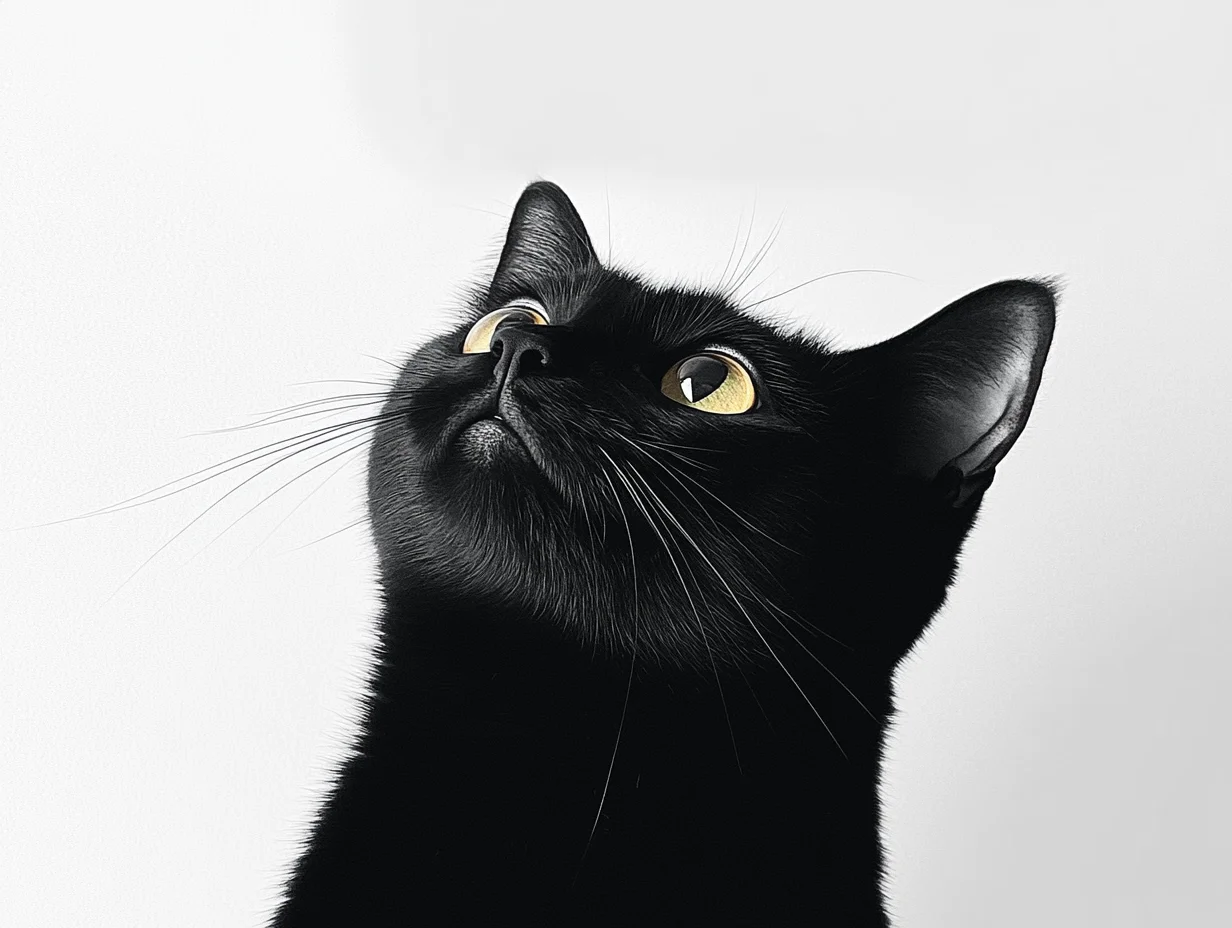
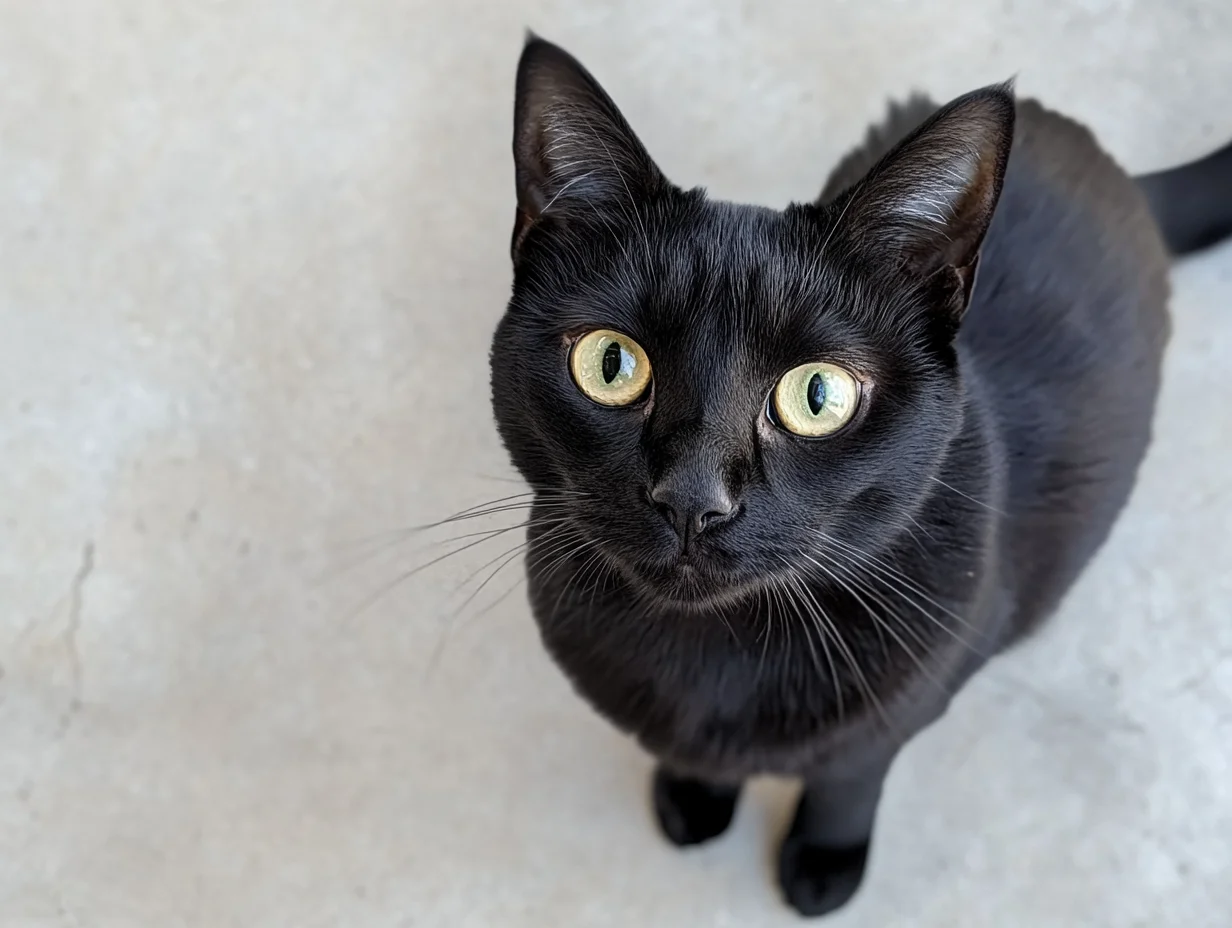
- Video specifications: Custom video resolution (720P/1080P for wan2.7; 480P/720P/1080P for wan2.2). Duration: 2-15s for wan2.7, fixed 5s for wan2.2.
- Audio capabilities: wan2.7 supports automatic dubbing and custom audio for audio-video sync.
- Additional capabilities: Prompt rewriting and watermarking.
Quick links: API reference: wan2.7, wan2.2 | Prompt guide
Getting started
| Prompt | First frame | Last frame | Output video |
|---|
| A cute blue monster with a slightly sad expression stands in the rain. The camera slowly zooms in and stops on the moment it looks up at the sky. | | | |
Before calling the API, get an API key. Then set your API key as an environment variable.
Wan 2.7 uses the same wan2.7-i2v model as first-frame image-to-video. Provide both first_frame and last_frame in the media array.Step 1: Create a taskcurl --location 'https://dashscope-intl.aliyuncs.com/api/v1/services/aigc/video-generation/video-synthesis' \
-H 'X-DashScope-Async: enable' \
-H "Authorization: Bearer $DASHSCOPE_API_KEY" \
-H 'Content-Type: application/json' \
-d '{
"model": "wan2.7-i2v",
"input": {
"prompt": "Realistic style, a small black cat looks up at the sky curiously. The camera angle gradually rises from eye level, finally capturing its curious gaze from a top-down view.",
"media": [
{
"type": "first_frame",
"url": "https://wanx.alicdn.com/material/20250318/first_frame.png"
},
{
"type": "last_frame",
"url": "https://wanx.alicdn.com/material/20250318/last_frame.png"
}
]
},
"parameters": {
"resolution": "720P",
"duration": 10,
"prompt_extend": false,
"watermark": true
}
}'
{task_id} with the task_id value returned by the previous API call.curl -X GET 'https://dashscope-intl.aliyuncs.com/api/v1/tasks/{task_id}' \
-H "Authorization: Bearer $DASHSCOPE_API_KEY"
Key differences from wan2.2: wan2.7 uses resolution (720P/1080P) instead of pixel dimensions, supports 2-15s duration (not fixed at 5s), and uses the media array instead of first_frame_url/last_frame_url parameters. watermark defaults to false.
Step 1: Create a task to get the task IDcurl --location 'https://dashscope-intl.aliyuncs.com/api/v1/services/aigc/image2video/video-synthesis' \
-H 'X-DashScope-Async: enable' \
-H "Authorization: Bearer $DASHSCOPE_API_KEY" \
-H 'Content-Type: application/json' \
-d '{
"model": "wan2.2-kf2v-flash",
"input": {
"first_frame_url": "https://help-static-aliyun-doc.aliyuncs.com/file-manage-files/zh-CN/20260126/ixdxvt/wan-kf2v-blue-1.png",
"last_frame_url": "https://help-static-aliyun-doc.aliyuncs.com/file-manage-files/zh-CN/20260126/nhtdrc/wan-kf2v-blue-2.png",
"prompt": "A cute blue monster with a slightly sad expression stands in the rain. The camera slowly zooms in and stops on the moment it looks up at the sky."
},
"parameters": {
"resolution": "720P",
"prompt_extend": true,
"watermark": true
}
}'
{task_id} with the task_id value returned by the previous API call.curl -X GET https://dashscope-intl.aliyuncs.com/api/v1/tasks/{task_id} \
--header "Authorization: Bearer $DASHSCOPE_API_KEY"
Python and Java SDK examples (wan2.2)
To use the SDK, install the DashScope SDK.Make sure your DashScope Python SDK version is at least 1.25.8 before running the code below.If your version is too low, you may see errors such as "url error, please check url!". Install the SDK. import os
from http import HTTPStatus
from dashscope import VideoSynthesis
import dashscope
dashscope.base_http_api_url = 'https://dashscope-intl.aliyuncs.com/api/v1'
api_key = os.getenv("DASHSCOPE_API_KEY", "YOUR_API_KEY")
print('please wait...')
rsp = VideoSynthesis.call(api_key=api_key,
model="wan2.2-kf2v-flash",
prompt="A cute blue monster with a slightly sad expression stands in the rain. The camera slowly zooms in and stops on the moment it looks up at the sky.",
first_frame_url="https://help-static-aliyun-doc.aliyuncs.com/file-manage-files/zh-CN/20260126/ixdxvt/wan-kf2v-blue-1.png",
last_frame_url="https://help-static-aliyun-doc.aliyuncs.com/file-manage-files/zh-CN/20260126/nhtdrc/wan-kf2v-blue-2.png",
duration=5, # Fixed at 5 seconds. Do not change.
prompt_extend=True,
watermark=True)
print(rsp)
if rsp.status_code == HTTPStatus.OK:
print("video_url:", rsp.output.video_url)
else:
print('Failed, status_code: %s, code: %s, message: %s' % (rsp.status_code, rsp.code, rsp.message))
Make sure your DashScope Java SDK version is at least 2.22.6 before running the code below.If your version is too low, you may see errors such as "url error, please check url!". Install the SDK. import com.alibaba.dashscope.aigc.videosynthesis.VideoSynthesis;
import com.alibaba.dashscope.aigc.videosynthesis.VideoSynthesisParam;
import com.alibaba.dashscope.aigc.videosynthesis.VideoSynthesisResult;
import com.alibaba.dashscope.exception.ApiException;
import com.alibaba.dashscope.exception.InputRequiredException;
import com.alibaba.dashscope.exception.NoApiKeyException;
import com.alibaba.dashscope.utils.JsonUtils;
import com.alibaba.dashscope.utils.Constants;
public class Image2Video {
static {
Constants.baseHttpApiUrl = "https://dashscope-intl.aliyuncs.com/api/v1";
}
// If you have not set an environment variable, replace the line below with: apiKey="sk-xxx"
static String apiKey = System.getenv("DASHSCOPE_API_KEY");
public static void image2video() throws ApiException, NoApiKeyException, InputRequiredException {
VideoSynthesis vs = new VideoSynthesis();
VideoSynthesisParam param =
VideoSynthesisParam.builder()
.apiKey(apiKey)
.model("wan2.2-kf2v-flash")
.prompt("A cute blue monster with a slightly sad expression stands in the rain. The camera slowly zooms in and stops on the moment it looks up at the sky.")
.firstFrameUrl("https://help-static-aliyun-doc.aliyuncs.com/file-manage-files/zh-CN/20260126/ixdxvt/wan-kf2v-blue-1.png")
.lastFrameUrl("https://help-static-aliyun-doc.aliyuncs.com/file-manage-files/zh-CN/20260126/nhtdrc/wan-kf2v-blue-2.png")
.resolution("720P")
.promptExtend(true)
.watermark(true)
.build();
System.out.println("please wait...");
VideoSynthesisResult result = vs.call(param);
System.out.println(JsonUtils.toJson(result));
}
public static void main(String[] args) {
try {
image2video();
} catch (ApiException | NoApiKeyException | InputRequiredException e) {
System.out.println(e.getMessage());
}
System.exit(0);
}
}
video_url expires after 24 hours. Download the video promptly.
{
  "request_id": "c1209113-8437-424f-a386-xxxxxx",
  "output": {
    "task_id": "966cebcd-dedc-4962-af88-xxxxxx",
    "task_status": "SUCCEEDED",
    "video_url": "https://dashscope-result-sh.oss-accelerate.aliyuncs.com/xxx.mp4?Expires=xxx",
         ...
  },
  ...
}
Availability
Supported models:
| Model | Features | Input modalities | Output video specifications |
|---|
wan2.7-i2v Recommended | Audio sync, first-frame, first-last-frame, and video continuation via unified media array | Text, image | Resolution: 720P, 1080P. Duration: 2-15s. 30 fps, MP4 (H.264) |
| wan2.2-kf2v-flash | Video without audio. Overall stability and success rate have improved compared to model 2.1. | Text, image | Resolution options: 480P, 720P, 1080P. Video duration: 5s. Defined specifications: 30 fps, MP4 (H.264 encoding) |
| wan2.1-kf2v-plus | Video without audio | Text, image | Resolution options: 480P, 720P. Video duration: 5s. Defined specifications: 30 fps, MP4 (H.264 encoding) |
Core capabilities
Description: Generates smooth videos from a first-frame and a last-frame image.
wan2.7-i2v parameters
Use the media array with first_frame and last_frame types. The same model and endpoint is used for both first-frame and first-last-frame generation.
input.prompt: Required. Up to 5,000 characters.input.media: Required. Array containing one first_frame item and one last_frame item.input.negative_prompt: Optional. Up to 500 characters.parameters.resolution: Optional. 720P or 1080P (default: 1080P).parameters.duration: Optional. 2-15 seconds (default: 5).parameters.prompt_extend: Optional. Default: true.parameters.watermark: Optional. Default: false.parameters.seed: Optional. 0 to 2147483647.
wan2.2 / wan2.1 parameters
first_frame_url: Required. URL of the first-frame image. The output video aspect ratio matches this image. Must be publicly accessible (HTTP or HTTPS). Image requirements: Format: JPEG, JPG, PNG (no alpha channel), BMP, WEBP. Resolution: 360-2000 pixels per side. Max file size: 10 MB.last_frame_url: Required. URL of the last-frame image. Must be publicly accessible (HTTP or HTTPS). Resolution may differ from the first frame; alignment is not required. Image requirements: Same as first-frame image.prompt: Optional but recommended. Text prompt describing the desired video content. Supports Chinese and English. Maximum 800 characters; excess is automatically truncated. If the subject or scene changes between frames, describe the transition (e.g., camera movement or subject movement).negative_prompt: Optional. Describes content you do NOT want in the video. Supports Chinese and English. Maximum 500 characters; excess is automatically truncated.seed: Optional. Random seed for reproducibility. Range: 0 to 2147483647. If omitted, a random seed is used. Results may still vary due to model randomness.
| Prompt | First frame | Last frame | Output video |
|---|
| Realistic style. A curious black kitten looks up at the sky. The camera starts at eye level and gradually rises until it captures the kitten's curious gaze from above. | | | |
Make sure your DashScope Python SDK version is at least 1.25.8. Install the SDK. import os
from http import HTTPStatus
from dashscope import VideoSynthesis
import dashscope
dashscope.base_http_api_url = 'https://dashscope-intl.aliyuncs.com/api/v1'
api_key = os.getenv("DASHSCOPE_API_KEY", "YOUR_API_KEY")
def sample_async_call_kf2v():
# Asynchronous call returns a task_id
rsp = VideoSynthesis.async_call(api_key=api_key,
model="wan2.2-kf2v-flash",
prompt="Realistic style. A curious black kitten looks up at the sky. The camera starts at eye level and gradually rises until it captures the kitten's curious gaze from above.",
first_frame_url="https://wanx.alicdn.com/material/20250318/first_frame.png",
last_frame_url="https://wanx.alicdn.com/material/20250318/last_frame.png",
duration=5, # Fixed at 5 seconds. Do not change.
prompt_extend=True,
watermark=True)
print(rsp)
if rsp.status_code == HTTPStatus.OK:
print("task_id: %s" % rsp.output.task_id)
else:
print('Failed, status_code: %s, code: %s, message: %s' % (rsp.status_code, rsp.code, rsp.message))
# Wait for asynchronous task to complete
rsp = VideoSynthesis.wait(task=rsp, api_key=api_key)
print(rsp)
if rsp.status_code == HTTPStatus.OK:
print(rsp.output.video_url)
else:
print('Failed, status_code: %s, code: %s, message: %s' % (rsp.status_code, rsp.code, rsp.message))
if __name__ == '__main__':
sample_async_call_kf2v()
Make sure your DashScope Java SDK version is at least 2.22.6. Install the SDK. import com.alibaba.dashscope.aigc.videosynthesis.VideoSynthesis;
import com.alibaba.dashscope.aigc.videosynthesis.VideoSynthesisParam;
import com.alibaba.dashscope.aigc.videosynthesis.VideoSynthesisResult;
import com.alibaba.dashscope.exception.ApiException;
import com.alibaba.dashscope.exception.InputRequiredException;
import com.alibaba.dashscope.exception.NoApiKeyException;
import com.alibaba.dashscope.utils.JsonUtils;
import com.alibaba.dashscope.utils.Constants;
public class Image2Video {
static {
Constants.baseHttpApiUrl = "https://dashscope-intl.aliyuncs.com/api/v1";
}
// If you have not set an environment variable, replace the line below with: apiKey="sk-xxx"
static String apiKey = System.getenv("DASHSCOPE_API_KEY");
public static void image2video() throws ApiException, NoApiKeyException, InputRequiredException {
VideoSynthesis vs = new VideoSynthesis();
VideoSynthesisParam param =
VideoSynthesisParam.builder()
.apiKey(apiKey)
.model("wan2.2-kf2v-flash")
.prompt("Realistic style. A curious black kitten looks up at the sky. The camera starts at eye level and gradually rises until it captures the kitten's curious gaze from above.")
.firstFrameUrl("https://wanx.alicdn.com/material/20250318/first_frame.png")
.lastFrameUrl("https://wanx.alicdn.com/material/20250318/last_frame.png")
.resolution("720P")
.promptExtend(true)
.watermark(true)
.build();
// Asynchronous call
VideoSynthesisResult task = vs.asyncCall(param);
System.out.println(JsonUtils.toJson(task));
System.out.println("please wait...");
// Get result
VideoSynthesisResult result = vs.wait(task, apiKey);
System.out.println(JsonUtils.toJson(result));
}
public static void main(String[] args) {
try {
image2video();
} catch (ApiException | NoApiKeyException | InputRequiredException e) {
System.out.println(e.getMessage());
}
System.exit(0);
}
}
Step 1: Create a task to get the task IDcurl --location 'https://dashscope-intl.aliyuncs.com/api/v1/services/aigc/image2video/video-synthesis' \
-H 'X-DashScope-Async: enable' \
-H "Authorization: Bearer $DASHSCOPE_API_KEY" \
-H 'Content-Type: application/json' \
-d '{
"model": "wan2.2-kf2v-flash",
"input": {
"first_frame_url": "https://wanx.alicdn.com/material/20250318/first_frame.png",
"last_frame_url": "https://wanx.alicdn.com/material/20250318/last_frame.png",
"prompt": "Realistic style. A curious black kitten looks up at the sky. The camera starts at eye level and gradually rises until it captures the kitten's curious gaze from above."
},
"parameters": {
"resolution": "720P",
"prompt_extend": true,
"watermark": true
}
}'
{task_id} with the task_id value returned by the previous API call.curl -X GET https://dashscope-intl.aliyuncs.com/api/v1/tasks/{task_id} \
--header "Authorization: Bearer $DASHSCOPE_API_KEY"
- Number of images: One first-frame image and one last-frame image.
- Image format: JPEG, JPG, PNG (no alpha channel), BMP, WEBP.
- Image resolution: 360-2000 pixels per side.
- Max file size: 10 MB per image.
- Input methods: Image URL, local file path.
Method 1: Image URL (HTTP API and SDK) — Recommended
- Public URL: Supports HTTP or HTTPS. Example:
https://xxxx/xxx.png.
Method 2: Local file path (SDK only)
Different programming languages (Python and Java) have different path requirements. Follow the rules below exactly.Python SDK: Supports absolute and relative paths. Path rules:| Operating system | Input file path | Example (absolute path) | Example (relative path) |
|---|
| Linux / macOS | file://{absolute or relative path} | file:///home/images/test.png | file://./images/test.png |
| Windows | file://{absolute or relative path} | file://D:/images/test.png | file://./images/test.png |
| Operating system | Input file path | Example (absolute path) |
|---|
| Linux / macOS | file://{absolute path} | file:///home/images/test.png |
| Windows | file:///{absolute path} | file:///D:/images/test.png |
import os
from http import HTTPStatus
# dashscope sdk >= 1.25.8
from dashscope import VideoSynthesis
import dashscope

dashscope.base_http_api_url = 'https://dashscope-intl.aliyuncs.com/api/v1'

# Get the DashScope API key (API key) from the environment variable
api_key = os.getenv("DASHSCOPE_API_KEY")

# ========== Image input method (choose one) ==========
# [Method 1] Use a public image URL
first_frame_url = "https://wanx.alicdn.com/material/20250318/first_frame.png"
last_frame_url = "https://wanx.alicdn.com/material/20250318/last_frame.png"

# [Method 2] Use a local file path (file:// + file path)
# Use an absolute path
# first_frame_url = "file://" + "/path/to/your/first_frame.png"  # Linux/macOS
# last_frame_url = "file://" + "C:/path/to/your/last_frame.png"  # Windows
# Or use a relative path
# first_frame_url = "file://" + "./first_frame.png"              # Use your actual path
# last_frame_url = "file://" + "./last_frame.png"                # Use your actual path

def sample_sync_call_kf2v():
  print('please wait...')
  rsp = VideoSynthesis.call(api_key=api_key,
                                model="wan2.2-kf2v-flash",
                                prompt="Realistic style, a small black cat looks up at the sky curiously, the camera gradually rises from eye level, and finally captures its curious gaze from a top-down view.",
                                first_frame_url=first_frame_url,
                                last_frame_url=last_frame_url,
                                resolution="720P",
                                prompt_extend=True)
  print(rsp)
  if rsp.status_code == HTTPStatus.OK:
    print(rsp.output.video_url)
  else:
    print('Failed, status_code: %s, code: %s, message: %s' %
                (rsp.status_code, rsp.code, rsp.message))


if __name__ == '__main__':
  sample_sync_call_kf2v()
// Copyright (c) Alibaba, Inc. and its affiliates.

// dashscope sdk >= 2.20.1
import com.alibaba.dashscope.aigc.videosynthesis.VideoSynthesis;
import com.alibaba.dashscope.aigc.videosynthesis.VideoSynthesisParam;
import com.alibaba.dashscope.aigc.videosynthesis.VideoSynthesisResult;
import com.alibaba.dashscope.exception.ApiException;
import com.alibaba.dashscope.exception.InputRequiredException;
import com.alibaba.dashscope.exception.NoApiKeyException;
import com.alibaba.dashscope.utils.Constants;
import com.alibaba.dashscope.utils.JsonUtils;

import java.util.HashMap;
import java.util.Map;


public class Kf2vSyncIntl {

  static {
    Constants.baseHttpApiUrl = "https://dashscope-intl.aliyuncs.com/api/v1";
  }

  // Get the DashScope API key (API key) from the environment variable
  static String apiKey = System.getenv("DASHSCOPE_API_KEY");

  /**
       * Image input method (choose one):
       *
       * [Method 1] Public URL
       */
  static String firstFrameUrl = "https://wanx.alicdn.com/material/20250318/first_frame.png";
  static String lastFrameUrl = "https://wanx.alicdn.com/material/20250318/last_frame.png";

       /**
       * [Method 2] Local file path (file:// + absolute path or file:/// + absolute path)
       */
  // static String firstFrameUrl = "file://" + "/your/path/to/first_frame.png";  // Linux/macOS
  // static String lastFrameUrl = "file:///" + "C:/path/to/your/img.png";        // Windows

  public static void syncCall() {

    Map<String, Object> parameters = new HashMap<>();
    parameters.put("prompt_extend", true);
    parameters.put("resolution", "720P");

    VideoSynthesis videoSynthesis = new VideoSynthesis();
    VideoSynthesisParam param =
        VideoSynthesisParam.builder()
            .apiKey(apiKey)
            .model("wan2.2-kf2v-flash")
            .prompt("Realistic style, a small black cat looks up at the sky curiously, the camera gradually rises from eye level, and finally captures its curious gaze from a top-down view.")
            .firstFrameUrl(firstFrameUrl)
            .lastFrameUrl(lastFrameUrl)
            .parameters(parameters)
            .build();
    VideoSynthesisResult result = null;
    try {
      System.out.println("---sync call, please wait a moment----");
      result = videoSynthesis.call(param);
    } catch (ApiException | NoApiKeyException e){
      throw new RuntimeException(e.getMessage());
    } catch (InputRequiredException e) {
      throw new RuntimeException(e);
    }
    System.out.println(JsonUtils.toJson(result));
  }

  public static void main(String[] args) {
    syncCall();
  }
}
Output video
- Number of videos: One.
- Specifications: Specifications vary by model. See Availability.
- URL expiration: 24 hours.
- Dimensions: Determined by the first-frame image and the
resolution setting.
- The model preserves the aspect ratio of the first-frame image and scales the total pixel count close to the target. Because of encoding requirements, the output width and height must be divisible by 16. The model adjusts dimensions automatically.
- For example: Input image is 750x1000 (aspect ratio 3:4 = 0.75). Set resolution = "720P" (target pixel count approximately 920,000). Output may be 816 x 1104 (aspect ratio approximately 0.739, pixel count approximately 900,000), with both dimensions divisible by 16.
Billing and rate limits
- For free quota and pricing details, see Model invocation pricing.
- For model rate limits, see Rate limits.
- Billing details:
- Input is free. Output is billed. Billing is based on the number of successful video seconds generated.
- Failed or erroneous calls incur no charges and do not consume your free trial quota.
API reference
FAQ
How do I generate a video with a specific aspect ratio (such as 3:4)?
wan2.7: The aspect ratio is determined by the first-frame image. When a first_frame is provided in the media array, the ratio parameter is ignored and the output matches the image's aspect ratio.
wan2.2 and earlier: The API does not support specifying aspect ratios directly. You can only set the video resolution using the resolution parameter.
The resolution parameter controls total pixel count, not strict aspect ratio. The model prioritizes preserving the original aspect ratio of the first-frame image (first_frame_url) and makes minor adjustments to meet encoding requirements (width and height must be multiples of 16). To get a video close to 3:4, upload a first-frame image with a 3:4 aspect ratio.
For example: Input image is 750x1000 (aspect ratio 3:4 = 0.75). Set resolution = "720P" (target pixel count approximately 920,000). Output may be 816 x 1104 (aspect ratio approximately 0.739, pixel count approximately 900,000), with both dimensions divisible by 16.
SDK error: "url error, please check url!"
Make sure:
- Your DashScope Python SDK version is at least
1.25.8.
- Your DashScope Java SDK version is at least
2.22.6.
If your version is too low, you may see the "url error, please check url!" error. Upgrade the SDK.%22%3E%3Cpath%20d%3D%22M22.917059%2C9.3123641L25.43714%2C17.663866L27.955452%2C9.3123617L30.922102%2C9.3123617L33.442169%2C17.663866L35.963985%2C9.3123617L38.874596%2C9.3123617L34.890476%2C22.443415L31.918562%2C22.443415L29.407253%2C14.12346L26.885426%2C22.443415L23.913528%2C22.443415L19.950422%2C9.3123617L22.917059%2C9.3123641ZM50.648335%2C21.118393C52.140423%2C19.905538999999997%2C52.690331%2C18.259778%2C52.690331%2C18.259778L49.336666%2C18.259778L49.326145%2C18.272044C48.6992%2C19.032709%2C47.818314%2C19.562015000000002%2C46.842865%2C19.693468C44.918228%2C19.952863%2C43.170448%2C18.790837%2C42.624062%2C17.011871L53.012554%2C17.003104999999998C53.012554%2C17.003104999999998%2C53.245483%2C15.988307%2C53.021313%2C14.747413L52.988052%2C14.563382C52.345333%2C11.242057800000001%2C49.36993%2C8.882956499999999%2C45.933952%2C9.0669875C42.496212%2C9.2510195%2C39.70295%2C12.0412807%2C39.512051%2C15.483535C39.284393%2C19.567276%2C42.674839%2C22.935917%2C46.764038%2C22.667757C47.918125%2C22.592388%2C49.320896%2C22.19804%2C50.648335%2C21.118393ZM42.680107%2C14.563382C43.224735%2C13.0490694%2C44.68354%2C12.0114851%2C46.308701%2C12.0114851C47.933887%2C12.0114851%2C49.390945%2C13.0490665%2C49.937336%2C14.563382L42.681839%2C14.563382L42.680107%2C14.563382ZM67.69342%2C14.896389C67.681145%2C14.481006%2C67.642632%2C14.090162%2C67.579575%2C13.7256031C67.03669%2C11.0878215%2C64.698753%2C9.098537%2C61.884464%2C9.058225199999999C61.60603%2C9.058225199999999%2C61.339832%2C9.0739999%2C61.084137%2C9.100289799999999C60.047398%2C9.224729499999999%2C59.094719%2C9.612071%2C58.296127%2C10.1957116C58.194557%2C10.2833457%2C58.099998%2C10.3762355%2C58.007172%2C10.4726343L58.007172%2C9.3123641L55.098312%2C9.3123641L55.098312%2C22.443415L58.022934%2C22.443415C58.022934%2C22.443415%2C58.026428%2C15.359098%2C58.026428%2C15.343325C58.02993%2C13.5065165%2C59.562294%2C12.0307665%2C61.408127%2C12.0307665C63.253963%2C12.0307665%2C64.749542%2C13.5082712%2C64.789825%2C15.343325L64.79332%2C15.343325L64.79332%2C22.443415L67.700409%2C22.443415L67.700409%2C15.189087C67.700409%2C15.089187%2C67.696915%2C14.992788%2C67.69342%2C14.896389ZM18.372526%2C13.2348528C18.372526%2C8.157349100000001%2C14.260557%2C4.040311564%2C9.1871405%2C4.040311564C4.1137228%2C4.040311564%2C0%2C8.157349100000001%2C0%2C13.2348528C0%2C18.312358%2C4.1137228%2C22.429392%2C9.1871405%2C22.429392C10.399014%2C22.429392%2C11.554851%2C22.192783%2C12.614367%2C21.765127L11.075002%2C19.097554000000002C10.479573%2C19.290354%2C9.8456116%2C19.395505999999997%2C9.1871405%2C19.395505999999997C5.7931881%2C19.395505999999997%2C3.0314398%2C16.63154%2C3.0314398%2C13.2348528C3.0314398%2C9.8381624%2C5.7931881%2C7.074192%2C9.1871405%2C7.074192C12.58109%2C7.074192%2C15.342837%2C9.8381624%2C15.342837%2C13.2348528C15.342837%2C14.598434%2C14.898015%2C15.858609%2C14.144976%2C16.880418L13.560053%2C15.86562C13.482993%2C15.732415%2C13.339392%2C15.648287%2C13.185282%2C15.648287L11.654673%2C15.648287C11.500564%2C15.648287%2C11.356962%2C15.730662%2C11.279905%2C15.86562L10.891122%2C16.538645000000002C10.814066%2C16.673600999999998%2C10.814066%2C16.838354000000002%2C10.891122%2C16.97156L11.404244%2C17.86016L11.919115%2C18.752274999999997L13.439214%2C21.383049L14.046904%2C22.43465L14.055662%2C22.43465C14.055662%2C22.43465%2C17.344536%2C22.418877%2C17.344536%2C22.418877L15.754387%2C19.661915999999998C17.376059%2C18.003885%2C18.376034%2C15.73592%2C18.376034%2C13.2330971L18.372526%2C13.2348528ZM91.291718%2C4.040311564L91.291718%2C22.499498L94.221588%2C22.499498L94.221588%2C4.040311564L91.291718%2C4.040311564ZM121.05447%2C9.3123641L121.05447%2C16.386167C121.05447%2C18.107295%2C119.94243%2C19.849456%2C117.81638%2C19.849456C115.96879%2C19.849456%2C114.72716%2C18.536698%2C114.72716%2C16.584215999999998L114.72716%2C9.3123641L111.79726%2C9.3123641L111.79726%2C16.633292C111.79726%2C21.093859%2C114.6904%2C22.681776%2C117.39783%2C22.681776C118.83565%2C22.681776%2C120.19632%2C22.068344%2C121.17878%2C21.007975L121.17878%2C22.427639L123.98436%2C22.427639L123.98436%2C9.3123641L121.05447%2C9.3123641ZM109.78858%2C15.870879C109.78858%2C19.633876%2C106.74137%2C22.683531%2C102.98142%2C22.683531C99.221443%2C22.683531%2C96.174248%2C19.633876%2C96.174248%2C15.870879C96.174248%2C12.1078854%2C99.221443%2C9.058228%2C102.98142%2C9.058228C106.74137%2C9.058228%2C109.78858%2C12.1078825%2C109.78858%2C15.870879ZM106.82719%2C15.870879C106.82719%2C13.7483902%2C105.1022%2C12.0220022%2C102.98142%2C12.0220022C100.86064%2C12.0220022%2C99.135643%2C13.7483902%2C99.135643%2C15.870879C99.135643%2C17.99337%2C100.86064%2C19.719754000000002%2C102.98142%2C19.719754000000002C105.1022%2C19.719754000000002%2C106.82719%2C17.99337%2C106.82719%2C15.870879ZM139.45152%2C4.040311564L139.45152%2C22.427647L136.61623%2C22.427647L136.61623%2C21.488211C135.52171%2C22.240103%2C134.19772%2C22.68178%2C132.77042%2C22.68178C129.01048%2C22.68178%2C125.96327%2C19.632125000000002%2C125.96327%2C15.869125C125.96327%2C12.1061306%2C129.01048%2C9.0564728%2C132.77042%2C9.0564728C134.19772%2C9.0564728%2C135.52171%2C9.4981475%2C136.61623%2C10.250046300000001L136.61623%2C4.040311564L139.45152%2C4.040311564ZM136.61444%2C15.870879C136.61444%2C13.7483902%2C134.88948%2C12.0220022%2C132.76868%2C12.0220022C130.6479%2C12.0220022%2C128.92291%2C13.7483902%2C128.92291%2C15.870879C128.92291%2C17.99337%2C130.6479%2C19.719754000000002%2C132.76868%2C19.719754000000002C134.88948%2C19.719754000000002%2C136.61444%2C17.99337%2C136.61444%2C15.870879ZM86.395157%2C16.351111C85.389984%2C18.166885999999998%2C83.533615%2C19.386748%2C81.40934%2C19.386748C78.215027%2C19.386748%2C75.626656%2C16.63154%2C75.626656%2C13.2330999C75.626656%2C9.8346596%2C78.215027%2C7.0794525%2C81.40934%2C7.0794525C83.642189%2C7.0794525%2C85.579102%2C8.4272609%2C86.542305%2C10.400775L89.31279%2C9.187923C87.882004%2C6.1189854%2C84.876831%2C4%2C81.40934%2C4C76.560066%2C4%2C72.614449%2C8.1433263%2C72.614449%2C13.2348528C72.614449%2C18.326376%2C76.560066%2C22.469706%2C81.40934%2C22.469706C84.761269%2C22.469706%2C87.680626%2C20.490934%2C89.163918%2C17.586748L86.39344%2C16.352866L86.395157%2C16.351111Z%22%20fill%3D%22%23000000%22%20fill-opacity%3D%221%22%20style%3D%22mix-blend-mode%3Apassthrough%22%2F%3E%3C%2Fg%3E%3C%2Fsvg%3E)