%22%3E%3Cpath%20d%3D%22M22.917059%2C9.3123641L25.43714%2C17.663866L27.955452%2C9.3123617L30.922102%2C9.3123617L33.442169%2C17.663866L35.963985%2C9.3123617L38.874596%2C9.3123617L34.890476%2C22.443415L31.918562%2C22.443415L29.407253%2C14.12346L26.885426%2C22.443415L23.913528%2C22.443415L19.950422%2C9.3123617L22.917059%2C9.3123641ZM50.648335%2C21.118393C52.140423%2C19.905538999999997%2C52.690331%2C18.259778%2C52.690331%2C18.259778L49.336666%2C18.259778L49.326145%2C18.272044C48.6992%2C19.032709%2C47.818314%2C19.562015000000002%2C46.842865%2C19.693468C44.918228%2C19.952863%2C43.170448%2C18.790837%2C42.624062%2C17.011871L53.012554%2C17.003104999999998C53.012554%2C17.003104999999998%2C53.245483%2C15.988307%2C53.021313%2C14.747413L52.988052%2C14.563382C52.345333%2C11.242057800000001%2C49.36993%2C8.882956499999999%2C45.933952%2C9.0669875C42.496212%2C9.2510195%2C39.70295%2C12.0412807%2C39.512051%2C15.483535C39.284393%2C19.567276%2C42.674839%2C22.935917%2C46.764038%2C22.667757C47.918125%2C22.592388%2C49.320896%2C22.19804%2C50.648335%2C21.118393ZM42.680107%2C14.563382C43.224735%2C13.0490694%2C44.68354%2C12.0114851%2C46.308701%2C12.0114851C47.933887%2C12.0114851%2C49.390945%2C13.0490665%2C49.937336%2C14.563382L42.681839%2C14.563382L42.680107%2C14.563382ZM67.69342%2C14.896389C67.681145%2C14.481006%2C67.642632%2C14.090162%2C67.579575%2C13.7256031C67.03669%2C11.0878215%2C64.698753%2C9.098537%2C61.884464%2C9.058225199999999C61.60603%2C9.058225199999999%2C61.339832%2C9.0739999%2C61.084137%2C9.100289799999999C60.047398%2C9.224729499999999%2C59.094719%2C9.612071%2C58.296127%2C10.1957116C58.194557%2C10.2833457%2C58.099998%2C10.3762355%2C58.007172%2C10.4726343L58.007172%2C9.3123641L55.098312%2C9.3123641L55.098312%2C22.443415L58.022934%2C22.443415C58.022934%2C22.443415%2C58.026428%2C15.359098%2C58.026428%2C15.343325C58.02993%2C13.5065165%2C59.562294%2C12.0307665%2C61.408127%2C12.0307665C63.253963%2C12.0307665%2C64.749542%2C13.5082712%2C64.789825%2C15.343325L64.79332%2C15.343325L64.79332%2C22.443415L67.700409%2C22.443415L67.700409%2C15.189087C67.700409%2C15.089187%2C67.696915%2C14.992788%2C67.69342%2C14.896389ZM18.372526%2C13.2348528C18.372526%2C8.157349100000001%2C14.260557%2C4.040311564%2C9.1871405%2C4.040311564C4.1137228%2C4.040311564%2C0%2C8.157349100000001%2C0%2C13.2348528C0%2C18.312358%2C4.1137228%2C22.429392%2C9.1871405%2C22.429392C10.399014%2C22.429392%2C11.554851%2C22.192783%2C12.614367%2C21.765127L11.075002%2C19.097554000000002C10.479573%2C19.290354%2C9.8456116%2C19.395505999999997%2C9.1871405%2C19.395505999999997C5.7931881%2C19.395505999999997%2C3.0314398%2C16.63154%2C3.0314398%2C13.2348528C3.0314398%2C9.8381624%2C5.7931881%2C7.074192%2C9.1871405%2C7.074192C12.58109%2C7.074192%2C15.342837%2C9.8381624%2C15.342837%2C13.2348528C15.342837%2C14.598434%2C14.898015%2C15.858609%2C14.144976%2C16.880418L13.560053%2C15.86562C13.482993%2C15.732415%2C13.339392%2C15.648287%2C13.185282%2C15.648287L11.654673%2C15.648287C11.500564%2C15.648287%2C11.356962%2C15.730662%2C11.279905%2C15.86562L10.891122%2C16.538645000000002C10.814066%2C16.673600999999998%2C10.814066%2C16.838354000000002%2C10.891122%2C16.97156L11.404244%2C17.86016L11.919115%2C18.752274999999997L13.439214%2C21.383049L14.046904%2C22.43465L14.055662%2C22.43465C14.055662%2C22.43465%2C17.344536%2C22.418877%2C17.344536%2C22.418877L15.754387%2C19.661915999999998C17.376059%2C18.003885%2C18.376034%2C15.73592%2C18.376034%2C13.2330971L18.372526%2C13.2348528ZM91.291718%2C4.040311564L91.291718%2C22.499498L94.221588%2C22.499498L94.221588%2C4.040311564L91.291718%2C4.040311564ZM121.05447%2C9.3123641L121.05447%2C16.386167C121.05447%2C18.107295%2C119.94243%2C19.849456%2C117.81638%2C19.849456C115.96879%2C19.849456%2C114.72716%2C18.536698%2C114.72716%2C16.584215999999998L114.72716%2C9.3123641L111.79726%2C9.3123641L111.79726%2C16.633292C111.79726%2C21.093859%2C114.6904%2C22.681776%2C117.39783%2C22.681776C118.83565%2C22.681776%2C120.19632%2C22.068344%2C121.17878%2C21.007975L121.17878%2C22.427639L123.98436%2C22.427639L123.98436%2C9.3123641L121.05447%2C9.3123641ZM109.78858%2C15.870879C109.78858%2C19.633876%2C106.74137%2C22.683531%2C102.98142%2C22.683531C99.221443%2C22.683531%2C96.174248%2C19.633876%2C96.174248%2C15.870879C96.174248%2C12.1078854%2C99.221443%2C9.058228%2C102.98142%2C9.058228C106.74137%2C9.058228%2C109.78858%2C12.1078825%2C109.78858%2C15.870879ZM106.82719%2C15.870879C106.82719%2C13.7483902%2C105.1022%2C12.0220022%2C102.98142%2C12.0220022C100.86064%2C12.0220022%2C99.135643%2C13.7483902%2C99.135643%2C15.870879C99.135643%2C17.99337%2C100.86064%2C19.719754000000002%2C102.98142%2C19.719754000000002C105.1022%2C19.719754000000002%2C106.82719%2C17.99337%2C106.82719%2C15.870879ZM139.45152%2C4.040311564L139.45152%2C22.427647L136.61623%2C22.427647L136.61623%2C21.488211C135.52171%2C22.240103%2C134.19772%2C22.68178%2C132.77042%2C22.68178C129.01048%2C22.68178%2C125.96327%2C19.632125000000002%2C125.96327%2C15.869125C125.96327%2C12.1061306%2C129.01048%2C9.0564728%2C132.77042%2C9.0564728C134.19772%2C9.0564728%2C135.52171%2C9.4981475%2C136.61623%2C10.250046300000001L136.61623%2C4.040311564L139.45152%2C4.040311564ZM136.61444%2C15.870879C136.61444%2C13.7483902%2C134.88948%2C12.0220022%2C132.76868%2C12.0220022C130.6479%2C12.0220022%2C128.92291%2C13.7483902%2C128.92291%2C15.870879C128.92291%2C17.99337%2C130.6479%2C19.719754000000002%2C132.76868%2C19.719754000000002C134.88948%2C19.719754000000002%2C136.61444%2C17.99337%2C136.61444%2C15.870879ZM86.395157%2C16.351111C85.389984%2C18.166885999999998%2C83.533615%2C19.386748%2C81.40934%2C19.386748C78.215027%2C19.386748%2C75.626656%2C16.63154%2C75.626656%2C13.2330999C75.626656%2C9.8346596%2C78.215027%2C7.0794525%2C81.40934%2C7.0794525C83.642189%2C7.0794525%2C85.579102%2C8.4272609%2C86.542305%2C10.400775L89.31279%2C9.187923C87.882004%2C6.1189854%2C84.876831%2C4%2C81.40934%2C4C76.560066%2C4%2C72.614449%2C8.1433263%2C72.614449%2C13.2348528C72.614449%2C18.326376%2C76.560066%2C22.469706%2C81.40934%2C22.469706C84.761269%2C22.469706%2C87.680626%2C20.490934%2C89.163918%2C17.586748L86.39344%2C16.352866L86.395157%2C16.351111Z%22%20fill%3D%22%23000000%22%20fill-opacity%3D%221%22%20style%3D%22mix-blend-mode%3Apassthrough%22%2F%3E%3C%2Fg%3E%3C%2Fsvg%3E)
Stream TTS in real time
Qwen Cloud provides two families of real-time speech synthesis models: CosyVoice for streaming synthesis with SSML control, and Qwen-TTS-Realtime for real-time synthesis with instruction-based voice control, voice cloning, and voice design.
For more details, see Model comparison.
For complete code examples, see Getting started.
Core features
- Generates high-fidelity speech in real time with natural pronunciation in multiple languages, such as Chinese and English
- Supports voice customization through Qwen-TTS-Realtime voice cloning and voice design
- Supports streaming input and output with low-latency responses for real-time interactive scenarios
- Adjustable speech rate, pitch, volume, and bitrate for fine-grained control over vocal expression
- Compatible with mainstream audio formats, supporting output up to 48 kHz sample rate
- Supports instruction control, enabling natural language instructions to control vocal expressiveness
Availability
- CosyVoice
- Qwen-TTS-Realtime
Supported models:When you invoke the following models, use an API key.
- CosyVoice: cosyvoice-v3-plus, cosyvoice-v3-flash
Supported models:Use an API Key when calling the following models:
- Qwen3-TTS-Instruct-Flash-Realtime: qwen3-tts-instruct-flash-realtime (stable version, equivalent to qwen3-tts-instruct-flash-realtime-2026-01-22), qwen3-tts-instruct-flash-realtime-2026-01-22 (latest snapshot)
- Qwen3-TTS-VD-Realtime: qwen3-tts-vd-realtime-2026-01-15 (latest snapshot), qwen3-tts-vd-realtime-2025-12-16 (snapshot)
- Qwen3-TTS-VC-Realtime: qwen3-tts-vc-realtime-2026-01-15 (latest snapshot), qwen3-tts-vc-realtime-2025-11-27 (snapshot)
- Qwen3-TTS-Flash-Realtime: qwen3-tts-flash-realtime (stable version, equivalent to qwen3-tts-flash-realtime-2025-11-27), qwen3-tts-flash-realtime-2025-11-27 (latest snapshot), qwen3-tts-flash-realtime-2025-09-18 (snapshot)
Model selection
- CosyVoice
- Qwen-TTS-Realtime
| Scenario | Recommended | Reason | Notes |
|---|---|---|---|
| Intelligent customer service / Voice assistant | cosyvoice-v3-flash | Lower cost than plus models with support for streaming interaction and emotional expression, delivering fast responses at an affordable price point. | |
| Educational applications (including formula reading) | cosyvoice-v3-flash, cosyvoice-v3-plus | Supports LaTeX formula-to-speech conversion, ideal for mathematics, physics, and chemistry instruction. | cosyvoice-v3-plus has higher costs ($0.286706 per 10,000 characters). |
| Structured voice broadcasting (news/announcements) | cosyvoice-v3-plus, cosyvoice-v3-flash | Supports SSML for controlling speech rate, pauses, and pronunciation to enhance broadcast professionalism. | Implement the SSML generation logic independently. This model does not support emotion settings. |
| Precise speech-text alignment for scenarios such as caption generation, lesson playback, and dictation practice | cosyvoice-v3-flash, cosyvoice-v3-plus | Supports timestamp output to synchronize the synthesized speech with the original text. | Manually enable the timestamp feature. |
| Multilingual international products | cosyvoice-v3-flash, cosyvoice-v3-plus | Supports multiple languages. |
| Scenario | Recommended model | Reason |
|---|---|---|
| Voice customization for brand identity, exclusive voices, or extended system voices (based on text descriptions) | qwen3-tts-vd-realtime-2026-01-15 | Supports voice design. Creates customized voices from text descriptions without audio samples. Ideal for designing brand-exclusive voices from scratch. |
| Voice customization for brand identity, exclusive voices, or extended system voices (based on audio samples) | qwen3-tts-vc-realtime-2026-01-15 | Supports voice cloning. Quickly replicates voices from real audio samples to create lifelike brand voiceprints with high fidelity and consistency. |
| Emotional content production (audiobooks, radio dramas, game/animation dubbing) | qwen3-tts-instruct-flash-realtime | Supports instruction control. Precisely controls tone, speed, emotion, and character personality through natural language descriptions. Ideal for scenarios requiring rich expressiveness and character development. |
| Professional broadcasting (news, documentaries, advertising) | qwen3-tts-instruct-flash-realtime | Supports instruction control. Describes broadcasting styles and tonal characteristics (such as "authoritative and solemn" or "casual and friendly"). Suitable for professional content production. |
| Intelligent customer service and conversational bots | qwen3-tts-flash-realtime, qwen3-tts-instruct-flash-realtime | Supports streaming input and output with adjustable speech rate and pitch. The instruct version supports instruction control to dynamically adjust tone (such as reassuring, enthusiastic, or professional) based on conversation context. |
| Multilingual content broadcasting | qwen3-tts-flash-realtime, qwen3-tts-instruct-flash-realtime | Supports multiple languages and Chinese dialects, meeting global content distribution needs. |
| Audiobook reading and general content production | qwen3-tts-flash-realtime, qwen3-tts-instruct-flash-realtime | Adjustable volume, speech rate, and pitch to meet fine-grained production requirements for audiobooks, podcasts, and similar content. |
| E-commerce livestreaming and short video dubbing | qwen3-tts-flash-realtime, qwen3-tts-instruct-flash-realtime | Supports mp3/opus compressed formats, suitable for bandwidth-constrained scenarios. |
Getting started
- CosyVoice
- Qwen-TTS-Realtime
For more code examples, see GitHub.Get an API key and set it as an environment variable. To use the SDK, install it.
- Use system voices
Save synthesized audio to a file
For available voices, see the Voice list.- Python
- Java
Copy
# coding=utf-8

import os
import dashscope
from dashscope.audio.tts_v2 import *

# If you have not configured environment variables, replace the following line with your API key: dashscope.api_key = "sk-xxx"
dashscope.api_key = os.environ.get('DASHSCOPE_API_KEY')

dashscope.base_websocket_api_url='wss://dashscope-intl.aliyuncs.com/api-ws/v1/inference'

# Model
# cosyvoice-v3-flash/cosyvoice-v3-plus: Use voices such as longanyang.
# Each voice supports different languages. When synthesizing non-Chinese languages such as Japanese or Korean, select a voice that supports the corresponding language. For more information, see the CosyVoice voice list.
model = "cosyvoice-v3-flash"
# Voice
voice = "longanyang"

# Instantiate SpeechSynthesizer and pass request parameters such as model and voice in the constructor.
synthesizer = SpeechSynthesizer(model=model, voice=voice)
# Send the text to be synthesized and get the binary audio.
audio = synthesizer.call("How is the weather today?")
# The first time you send text, a WebSocket connection is established. The first packet delay includes the connection establishment time.
print('[Metric] Request ID: {}, First packet delay: {} ms'.format(
  synthesizer.get_last_request_id(),
  synthesizer.get_first_package_delay()))

# Save the audio locally.
with open('output.mp3', 'wb') as f:
  f.write(audio)
Copy
import com.alibaba.dashscope.audio.ttsv2.SpeechSynthesisParam;
import com.alibaba.dashscope.audio.ttsv2.SpeechSynthesizer;
import com.alibaba.dashscope.utils.Constants;

import java.io.File;
import java.io.FileOutputStream;
import java.io.IOException;
import java.nio.ByteBuffer;

public class Main {
  // Model
  // cosyvoice-v3-flash/cosyvoice-v3-plus: Use voices such as longanyang.
  // Each voice supports different languages. When synthesizing non-Chinese languages such as Japanese or Korean, select a voice that supports the corresponding language. For more information, see the CosyVoice voice list.
  private static String model = "cosyvoice-v3-flash";
  // Voice
  private static String voice = "longanyang";

  public static void streamAudioDataToSpeaker() {
    // Request parameters
    SpeechSynthesisParam param =
        SpeechSynthesisParam.builder()
            // If you have not configured environment variables, replace the following line with your API key: .apiKey("sk-xxx")
            .apiKey(System.getenv("DASHSCOPE_API_KEY"))
            .model(model) // Model
            .voice(voice) // Voice
            .build();

    // Synchronous mode: Disable callback (second parameter is null).
    SpeechSynthesizer synthesizer = new SpeechSynthesizer(param, null);
    ByteBuffer audio = null;
    try {
      // Block until audio returns.
      audio = synthesizer.call("How is the weather today?");
    } catch (Exception e) {
      throw new RuntimeException(e);
    } finally {
      // Close the WebSocket connection when the task ends.
      synthesizer.getDuplexApi().close(1000, "bye");
    }
    if (audio != null) {
      // Save the audio data to the local file "output.mp3".
      File file = new File("output.mp3");
      // The first time you send text, a WebSocket connection is established. The first packet delay includes the connection establishment time.
      System.out.println(
          "[Metric] Request ID: "
              + synthesizer.getLastRequestId()
              + ", First packet delay (ms): "
              + synthesizer.getFirstPackageDelay());
      try (FileOutputStream fos = new FileOutputStream(file)) {
        fos.write(audio.array());
      } catch (IOException e) {
        throw new RuntimeException(e);
      }
    }
  }

  public static void main(String[] args) {
    Constants.baseWebsocketApiUrl = "wss://dashscope-intl.aliyuncs.com/api-ws/v1/inference";
    streamAudioDataToSpeaker();
    System.exit(0);
  }
}
Convert LLM-generated text to speech in real time and play it through speakers
Play text from a Qwen model (qwen3.5-flash) as speech in real time on a local device.- Python
- Java
Before you run the Python example, install a third-party audio playback library using pip.
Copy
# coding=utf-8
# Installation instructions for pyaudio:
# APPLE Mac OS X
#   brew install portaudio
#   pip install pyaudio
# Debian/Ubuntu
#   sudo apt-get install python-pyaudio python3-pyaudio
#   or
#   pip install pyaudio
# CentOS
#   sudo yum install -y portaudio portaudio-devel && pip install pyaudio
# Microsoft Windows
#   python -m pip install pyaudio

import os
import pyaudio
import dashscope
from dashscope.audio.tts_v2 import *


from http import HTTPStatus
from dashscope import Generation

# If you have not configured environment variables, replace the following line with your API key: dashscope.api_key = "sk-xxx"
dashscope.api_key = os.environ.get('DASHSCOPE_API_KEY')

dashscope.base_websocket_api_url='wss://dashscope-intl.aliyuncs.com/api-ws/v1/inference'

# cosyvoice-v3-flash/cosyvoice-v3-plus: Use voices such as longanyang.
# Each voice supports different languages. When synthesizing non-Chinese languages such as Japanese or Korean, select a voice that supports the corresponding language. For more information, see the CosyVoice voice list.
model = "cosyvoice-v3-flash"
voice = "longanyang"


class Callback(ResultCallback):
  _player = None
  _stream = None

  def on_open(self):
    print("websocket is open.")
    self._player = pyaudio.PyAudio()
    self._stream = self._player.open(
      format=pyaudio.paInt16, channels=1, rate=22050, output=True
    )

  def on_complete(self):
    print("speech synthesis task complete successfully.")

  def on_error(self, message: str):
    print(f"speech synthesis task failed, {message}")

  def on_close(self):
    print("websocket is closed.")
    # stop player
    self._stream.stop_stream()
    self._stream.close()
    self._player.terminate()

  def on_event(self, message):
    print(f"recv speech synthsis message {message}")

  def on_data(self, data: bytes) -> None:
    print("audio result length:", len(data))
    self._stream.write(data)


def synthesizer_with_llm():
  callback = Callback()
  synthesizer = SpeechSynthesizer(
    model=model,
    voice=voice,
    format=AudioFormat.PCM_22050HZ_MONO_16BIT,
    callback=callback,
  )

  messages = [{"role": "user", "content": "Please introduce yourself"}]
  responses = Generation.call(
    model="qwen3.5-flash",
    messages=messages,
    result_format="message",  # set result format as 'message'
    stream=True,  # enable stream output
    incremental_output=True,  # enable incremental output
  )
  for response in responses:
    if response.status_code == HTTPStatus.OK:
      print(response.output.choices[0]["message"]["content"], end="")
      synthesizer.streaming_call(response.output.choices[0]["message"]["content"])
    else:
      print(
        "Request id: %s, Status code: %s, error code: %s, error message: %s"
        % (
          response.request_id,
          response.status_code,
          response.code,
          response.message,
        )
      )
  synthesizer.streaming_complete()
  print('requestId: ', synthesizer.get_last_request_id())


if __name__ == "__main__":
  synthesizer_with_llm()
Get an API key and install the SDK before running the code.For more example code, see GitHub.
- Use system voice
- Use cloned voice
- Use designed voice
See Supported voices for available voices.Replace the
model parameter with qwen3-tts-instruct-flash-realtime and set instructions using the instructions parameter to use the instruction control feature.- DashScope SDK
- WebSocket API
- Python
- Java
Server commit mode:Commit mode:
Copy
import os
import base64
import threading
import time
import dashscope
from dashscope.audio.qwen_tts_realtime import *


qwen_tts_realtime: QwenTtsRealtime = None
text_to_synthesize = [
  'Right? I love supermarkets like this.',
  'Especially during Chinese New Year,',
  'I go shopping at supermarkets.',
  'And I feel',
  'absolutely thrilled!',
  'I want to buy so many things!'
]

DO_VIDEO_TEST = False

def init_dashscope_api_key():
  """
    Set your DashScope API key. More information:
    https://github.com/aliyun/alibabacloud-bailian-speech-demo/blob/master/PREREQUISITES.md
  """

  if 'DASHSCOPE_API_KEY' in os.environ:
    dashscope.api_key = os.environ[
      'DASHSCOPE_API_KEY']  # Load API key from environment variable DASHSCOPE_API_KEY
  else:
    dashscope.api_key = 'your-dashscope-api-key'  # Set API key manually


class MyCallback(QwenTtsRealtimeCallback):
  def __init__(self):
    self.complete_event = threading.Event()
    self.file = open('result_24k.pcm', 'wb')

  def on_open(self) -> None:
    print('connection opened, init player')

  def on_close(self, close_status_code, close_msg) -> None:
    self.file.close()
    print('connection closed with code: {}, msg: {}, destroy player'.format(close_status_code, close_msg))

  def on_event(self, response: str) -> None:
    try:
      global qwen_tts_realtime
      type = response['type']
      if 'session.created' == type:
        print('start session: {}'.format(response['session']['id']))
      if 'response.audio.delta' == type:
        recv_audio_b64 = response['delta']
        self.file.write(base64.b64decode(recv_audio_b64))
      if 'response.done' == type:
        print(f'response {qwen_tts_realtime.get_last_response_id()} done')
      if 'session.finished' == type:
        print('session finished')
        self.complete_event.set()
    except Exception as e:
      print('[Error] {}'.format(e))
      return

  def wait_for_finished(self):
    self.complete_event.wait()


if __name__  == '__main__':
  init_dashscope_api_key()

  print('Initializing ...')

  callback = MyCallback()

  qwen_tts_realtime = QwenTtsRealtime(
    # To use instruction control, replace the model with qwen3-tts-instruct-flash-realtime
    model='qwen3-tts-flash-realtime',
    callback=callback,
    url='wss://dashscope-intl.aliyuncs.com/api-ws/v1/realtime'
    )

  qwen_tts_realtime.connect()
  qwen_tts_realtime.update_session(
    voice = 'Cherry',
    response_format = AudioFormat.PCM_24000HZ_MONO_16BIT,
    # To use instruction control, uncomment the following lines and replace the model with qwen3-tts-instruct-flash-realtime
    # instructions='Speak quickly with a rising intonation, suitable for introducing fashion products.',
    # optimize_instructions=True,
    mode = 'server_commit'
  )
  for text_chunk in text_to_synthesize:
    print(f'send text: {text_chunk}')
    qwen_tts_realtime.append_text(text_chunk)
    time.sleep(0.1)
  qwen_tts_realtime.finish()
  callback.wait_for_finished()
  print('[Metric] session: {}, first audio delay: {}'.format(
          qwen_tts_realtime.get_session_id(),
          qwen_tts_realtime.get_first_audio_delay(),
          ))
Copy
import base64
import os
import threading
import dashscope
from dashscope.audio.qwen_tts_realtime import *


qwen_tts_realtime: QwenTtsRealtime = None
text_to_synthesize = [
  'This is the first sentence.',
  'This is the second sentence.',
  'This is the third sentence.',
]

DO_VIDEO_TEST = False

def init_dashscope_api_key():
  """
    Set your DashScope API key. More information:
    https://github.com/aliyun/alibabacloud-bailian-speech-demo/blob/master/PREREQUISITES.md
  """

  if 'DASHSCOPE_API_KEY' in os.environ:
    dashscope.api_key = os.environ[
      'DASHSCOPE_API_KEY']  # Load API key from environment variable DASHSCOPE_API_KEY
  else:
    dashscope.api_key = 'your-dashscope-api-key'  # Set API key manually


class MyCallback(QwenTtsRealtimeCallback):
  def __init__(self):
    super().__init__()
    self.response_counter = 0
    self.complete_event = threading.Event()
    self.file = open(f'result_{self.response_counter}_24k.pcm', 'wb')

  def reset_event(self):
    self.response_counter += 1
    self.file = open(f'result_{self.response_counter}_24k.pcm', 'wb')
    self.complete_event = threading.Event()

  def on_open(self) -> None:
    print('connection opened, init player')

  def on_close(self, close_status_code, close_msg) -> None:
    print('connection closed with code: {}, msg: {}, destroy player'.format(close_status_code, close_msg))

  def on_event(self, response: str) -> None:
    try:
      global qwen_tts_realtime
      type = response['type']
      if 'session.created' == type:
        print('start session: {}'.format(response['session']['id']))
      if 'response.audio.delta' == type:
        recv_audio_b64 = response['delta']
        self.file.write(base64.b64decode(recv_audio_b64))
      if 'response.done' == type:
        print(f'response {qwen_tts_realtime.get_last_response_id()} done')
        self.complete_event.set()
        self.file.close()
      if 'session.finished' == type:
        print('session finished')
        self.complete_event.set()
    except Exception as e:
      print('[Error] {}'.format(e))
      return

  def wait_for_response_done(self):
    self.complete_event.wait()


if __name__  == '__main__':
  init_dashscope_api_key()

  print('Initializing ...')

  callback = MyCallback()

  qwen_tts_realtime = QwenTtsRealtime(
    # To use instruction control, replace the model with qwen3-tts-instruct-flash-realtime
    model='qwen3-tts-flash-realtime',
    callback=callback,
    url='wss://dashscope-intl.aliyuncs.com/api-ws/v1/realtime'
    )

  qwen_tts_realtime.connect()
  qwen_tts_realtime.update_session(
    voice = 'Cherry',
    response_format = AudioFormat.PCM_24000HZ_MONO_16BIT,
    # To use instruction control, uncomment the following lines and replace the model with qwen3-tts-instruct-flash-realtime
    # instructions='Speak quickly with a rising intonation, suitable for introducing fashion products.',
    # optimize_instructions=True,
    mode = 'commit'
  )
  print(f'send text: {text_to_synthesize[0]}')
  qwen_tts_realtime.append_text(text_to_synthesize[0])
  qwen_tts_realtime.commit()
  callback.wait_for_response_done()
  callback.reset_event()

  print(f'send text: {text_to_synthesize[1]}')
  qwen_tts_realtime.append_text(text_to_synthesize[1])
  qwen_tts_realtime.commit()
  callback.wait_for_response_done()
  callback.reset_event()

  print(f'send text: {text_to_synthesize[2]}')
  qwen_tts_realtime.append_text(text_to_synthesize[2])
  qwen_tts_realtime.commit()
  callback.wait_for_response_done()

  qwen_tts_realtime.finish()
  print('[Metric] session: {}, first audio delay: {}'.format(
          qwen_tts_realtime.get_session_id(),
          qwen_tts_realtime.get_first_audio_delay(),
          ))
Server commit mode:Commit mode:
Copy
import com.alibaba.dashscope.audio.qwen_tts_realtime.*;
import com.alibaba.dashscope.exception.NoApiKeyException;
import com.google.gson.JsonObject;
import javax.sound.sampled.LineUnavailableException;
import javax.sound.sampled.SourceDataLine;
import javax.sound.sampled.AudioFormat;
import javax.sound.sampled.DataLine;
import javax.sound.sampled.AudioSystem;
import java.io.FileNotFoundException;
import java.io.IOException;
import java.util.Base64;
import java.util.Queue;
import java.util.concurrent.CountDownLatch;
import java.util.concurrent.atomic.AtomicReference;
import java.util.concurrent.ConcurrentLinkedQueue;
import java.util.concurrent.atomic.AtomicBoolean;

public class Main {
  static String[] textToSynthesize = {
      "Right? I just really love this kind of supermarket",
      "Especially during the New Year",
      "Going to the supermarket",
      "Makes me feel",
      "Super, super happy!",
      "I want to buy so many things!"
  };

  // Real-time PCM audio player class
  public static class RealtimePcmPlayer {
    private int sampleRate;
    private SourceDataLine line;
    private AudioFormat audioFormat;
    private Thread decoderThread;
    private Thread playerThread;
    private AtomicBoolean stopped = new AtomicBoolean(false);
    private Queue<String> b64AudioBuffer = new ConcurrentLinkedQueue<>();
    private Queue<byte[]> RawAudioBuffer = new ConcurrentLinkedQueue<>();

    // The constructor initializes the audio format and audio line.
    public RealtimePcmPlayer(int sampleRate) throws LineUnavailableException {
      this.sampleRate = sampleRate;
      this.audioFormat = new AudioFormat(this.sampleRate, 16, 1, true, false);
      DataLine.Info info = new DataLine.Info(SourceDataLine.class, audioFormat);
      line = (SourceDataLine) AudioSystem.getLine(info);
      line.open(audioFormat);
      line.start();
      decoderThread = new Thread(new Runnable() {
        @Override
        public void run() {
          while (!stopped.get()) {
            String b64Audio = b64AudioBuffer.poll();
            if (b64Audio != null) {
              byte[] rawAudio = Base64.getDecoder().decode(b64Audio);
              RawAudioBuffer.add(rawAudio);
            } else {
              try {
                Thread.sleep(100);
              } catch (InterruptedException e) {
                throw new RuntimeException(e);
              }
            }
          }
        }
      });
      playerThread = new Thread(new Runnable() {
        @Override
        public void run() {
          while (!stopped.get()) {
            byte[] rawAudio = RawAudioBuffer.poll();
            if (rawAudio != null) {
              try {
                playChunk(rawAudio);
              } catch (IOException e) {
                throw new RuntimeException(e);
              } catch (InterruptedException e) {
                throw new RuntimeException(e);
              }
            } else {
              try {
                Thread.sleep(100);
              } catch (InterruptedException e) {
                throw new RuntimeException(e);
              }
            }
          }
        }
      });
      decoderThread.start();
      playerThread.start();
    }

    // Plays an audio chunk and blocks until playback is complete.
    private void playChunk(byte[] chunk) throws IOException, InterruptedException {
      if (chunk == null || chunk.length == 0) return;

      int bytesWritten = 0;
      while (bytesWritten < chunk.length) {
        bytesWritten += line.write(chunk, bytesWritten, chunk.length - bytesWritten);
      }
      int audioLength = chunk.length / (this.sampleRate*2/1000);
      // Waits for the audio in the buffer to finish playing.
      Thread.sleep(audioLength - 10);
    }

    public void write(String b64Audio) {
      b64AudioBuffer.add(b64Audio);
    }

    public void cancel() {
      b64AudioBuffer.clear();
      RawAudioBuffer.clear();
    }

    public void waitForComplete() throws InterruptedException {
      while (!b64AudioBuffer.isEmpty() || !RawAudioBuffer.isEmpty()) {
        Thread.sleep(100);
      }
      line.drain();
    }

    public void shutdown() throws InterruptedException {
      stopped.set(true);
      decoderThread.join();
      playerThread.join();
      if (line != null && line.isRunning()) {
        line.drain();
        line.close();
      }
    }
  }

  public static void main(String[] args) throws InterruptedException, LineUnavailableException, FileNotFoundException {
    QwenTtsRealtimeParam param = QwenTtsRealtimeParam.builder()
        // To use the instruction control feature, replace the model with qwen3-tts-instruct-flash-realtime.
        .model("qwen3-tts-flash-realtime")
        .url("wss://dashscope-intl.aliyuncs.com/api-ws/v1/realtime")
        .apikey(System.getenv("DASHSCOPE_API_KEY"))
        .build();
    AtomicReference<CountDownLatch> completeLatch = new AtomicReference<>(new CountDownLatch(1));
    final AtomicReference<QwenTtsRealtime> qwenTtsRef = new AtomicReference<>(null);

    // Creates a real-time audio player instance.
    RealtimePcmPlayer audioPlayer = new RealtimePcmPlayer(24000);

    QwenTtsRealtime qwenTtsRealtime = new QwenTtsRealtime(param, new QwenTtsRealtimeCallback() {
      @Override
      public void onOpen() {
        // Handles the event when the connection is established.
      }
      @Override
      public void onEvent(JsonObject message) {
        String type = message.get("type").getAsString();
        switch(type) {
          case "session.created":
            // Handles the event when the session is created.
            break;
          case "response.audio.delta":
            String recvAudioB64 = message.get("delta").getAsString();
            // Plays the audio in real time.
            audioPlayer.write(recvAudioB64);
            break;
          case "response.done":
            // Handles the event when the response is complete.
            break;
          case "session.finished":
            // Handles the event when the session is finished.
            completeLatch.get().countDown();
          default:
            break;
        }
      }
      @Override
      public void onClose(int code, String reason) {
        // Handles the event when the connection is closed.
      }
    });
    qwenTtsRef.set(qwenTtsRealtime);
    try {
      qwenTtsRealtime.connect();
    } catch (NoApiKeyException e) {
      throw new RuntimeException(e);
    }
    QwenTtsRealtimeConfig config = QwenTtsRealtimeConfig.builder()
        .voice("Cherry")
        .responseFormat(QwenTtsRealtimeAudioFormat.PCM_24000HZ_MONO_16BIT)
        .mode("server_commit")
        // To use the instruction control feature, uncomment the following lines and replace the model with qwen3-tts-instruct-flash-realtime.
        // .instructions("")
        // .optimizeInstructions(true)
        .build();
    qwenTtsRealtime.updateSession(config);
    for (String text:textToSynthesize) {
      qwenTtsRealtime.appendText(text);
      Thread.sleep(100);
    }
    qwenTtsRealtime.finish();
    completeLatch.get().await();
    qwenTtsRealtime.close();

    // Waits for audio playback to complete and then shuts down the player.
    audioPlayer.waitForComplete();
    audioPlayer.shutdown();
    System.exit(0);
  }
}
Copy
import com.alibaba.dashscope.audio.qwen_tts_realtime.*;
import com.alibaba.dashscope.exception.NoApiKeyException;
import com.google.gson.JsonObject;
import javax.sound.sampled.LineUnavailableException;
import javax.sound.sampled.SourceDataLine;
import javax.sound.sampled.AudioFormat;
import javax.sound.sampled.DataLine;
import javax.sound.sampled.AudioSystem;
import java.io.File;
import java.io.FileNotFoundException;
import java.io.FileOutputStream;
import java.io.IOException;
import java.util.Base64;
import java.util.Queue;
import java.util.Scanner;
import java.util.concurrent.CountDownLatch;
import java.util.concurrent.atomic.AtomicReference;
import java.util.concurrent.ConcurrentLinkedQueue;
import java.util.concurrent.atomic.AtomicBoolean;

public class commit {
  // Real-time PCM audio player class
  public static class RealtimePcmPlayer {
    private int sampleRate;
    private SourceDataLine line;
    private AudioFormat audioFormat;
    private Thread decoderThread;
    private Thread playerThread;
    private AtomicBoolean stopped = new AtomicBoolean(false);
    private Queue<String> b64AudioBuffer = new ConcurrentLinkedQueue<>();
    private Queue<byte[]> RawAudioBuffer = new ConcurrentLinkedQueue<>();

    // The constructor initializes the audio format and audio line.
    public RealtimePcmPlayer(int sampleRate) throws LineUnavailableException {
      this.sampleRate = sampleRate;
      this.audioFormat = new AudioFormat(this.sampleRate, 16, 1, true, false);
      DataLine.Info info = new DataLine.Info(SourceDataLine.class, audioFormat);
      line = (SourceDataLine) AudioSystem.getLine(info);
      line.open(audioFormat);
      line.start();
      decoderThread = new Thread(new Runnable() {
        @Override
        public void run() {
          while (!stopped.get()) {
            String b64Audio = b64AudioBuffer.poll();
            if (b64Audio != null) {
              byte[] rawAudio = Base64.getDecoder().decode(b64Audio);
              RawAudioBuffer.add(rawAudio);
            } else {
              try {
                Thread.sleep(100);
              } catch (InterruptedException e) {
                throw new RuntimeException(e);
              }
            }
          }
        }
      });
      playerThread = new Thread(new Runnable() {
        @Override
        public void run() {
          while (!stopped.get()) {
            byte[] rawAudio = RawAudioBuffer.poll();
            if (rawAudio != null) {
              try {
                playChunk(rawAudio);
              } catch (IOException e) {
                throw new RuntimeException(e);
              } catch (InterruptedException e) {
                throw new RuntimeException(e);
              }
            } else {
              try {
                Thread.sleep(100);
              } catch (InterruptedException e) {
                throw new RuntimeException(e);
              }
            }
          }
        }
      });
      decoderThread.start();
      playerThread.start();
    }

    // Plays an audio chunk and blocks until playback is complete.
    private void playChunk(byte[] chunk) throws IOException, InterruptedException {
      if (chunk == null || chunk.length == 0) return;

      int bytesWritten = 0;
      while (bytesWritten < chunk.length) {
        bytesWritten += line.write(chunk, bytesWritten, chunk.length - bytesWritten);
      }
      int audioLength = chunk.length / (this.sampleRate*2/1000);
      // Waits for the audio in the buffer to finish playing.
      Thread.sleep(audioLength - 10);
    }

    public void write(String b64Audio) {
      b64AudioBuffer.add(b64Audio);
    }

    public void cancel() {
      b64AudioBuffer.clear();
      RawAudioBuffer.clear();
    }

    public void waitForComplete() throws InterruptedException {
      // Waits for all audio data in the buffers to finish playing.
      while (!b64AudioBuffer.isEmpty() || !RawAudioBuffer.isEmpty()) {
        Thread.sleep(100);
      }
      // Waits for the audio line to finish playing.
      line.drain();
    }

    public void shutdown() throws InterruptedException {
      stopped.set(true);
      decoderThread.join();
      playerThread.join();
      if (line != null && line.isRunning()) {
        line.drain();
        line.close();
      }
    }
  }

  public static void main(String[] args) throws InterruptedException, LineUnavailableException, FileNotFoundException {
    Scanner scanner = new Scanner(System.in);

    QwenTtsRealtimeParam param = QwenTtsRealtimeParam.builder()
    // To use the instruction control feature, replace the model with qwen3-tts-instruct-flash-realtime.
    .model("qwen3-tts-flash-realtime")
    .url("wss://dashscope-intl.aliyuncs.com/api-ws/v1/realtime")
    .apikey(System.getenv("DASHSCOPE_API_KEY"))
    .build();

    AtomicReference<CountDownLatch> completeLatch = new AtomicReference<>(new CountDownLatch(1));

    // Creates a real-time player instance.
    RealtimePcmPlayer audioPlayer = new RealtimePcmPlayer(24000);

    final AtomicReference<QwenTtsRealtime> qwenTtsRef = new AtomicReference<>(null);
    QwenTtsRealtime qwenTtsRealtime = new QwenTtsRealtime(param, new QwenTtsRealtimeCallback() {
      //            File file = new File("result_24k.pcm");
      //            FileOutputStream fos = new FileOutputStream(file);
      @Override
      public void onOpen() {
        System.out.println("connection opened");
        System.out.println("Enter text and press Enter to send. Enter 'quit' to exit the program.");
      }
      @Override
      public void onEvent(JsonObject message) {
        String type = message.get("type").getAsString();
        switch(type) {
          case "session.created":
          System.out.println("start session: " + message.get("session").getAsJsonObject().get("id").getAsString());
          break;
          case "response.audio.delta":
          String recvAudioB64 = message.get("delta").getAsString();
          byte[] rawAudio = Base64.getDecoder().decode(recvAudioB64);
          //                            fos.write(rawAudio);
          // Plays the audio in real time.
          audioPlayer.write(recvAudioB64);
          break;
          case "response.done":
          System.out.println("response done");
          // Waits for the audio playback to complete.
          try {
            audioPlayer.waitForComplete();
          } catch (InterruptedException e) {
            throw new RuntimeException(e);
          }
          // Prepares for the next input.
          completeLatch.get().countDown();
          break;
          case "session.finished":
          System.out.println("session finished");
          if (qwenTtsRef.get() != null) {
            System.out.println("[Metric] response: " + qwenTtsRef.get().getResponseId() +
            ", first audio delay: " + qwenTtsRef.get().getFirstAudioDelay() + " ms");
          }
          completeLatch.get().countDown();
          default:
          break;
        }
      }
      @Override
      public void onClose(int code, String reason) {
        System.out.println("connection closed code: " + code + ", reason: " + reason);
        try {
          //                    fos.close();
          // Waits for playback to complete and then shuts down the player.
          audioPlayer.waitForComplete();
          audioPlayer.shutdown();
        } catch (InterruptedException e) {
          throw new RuntimeException(e);
        }
      }
    });
    qwenTtsRef.set(qwenTtsRealtime);
    try {
      qwenTtsRealtime.connect();
    } catch (NoApiKeyException e) {
      throw new RuntimeException(e);
    }
    QwenTtsRealtimeConfig config = QwenTtsRealtimeConfig.builder()
    .voice("Cherry")
    .responseFormat(QwenTtsRealtimeAudioFormat.PCM_24000HZ_MONO_16BIT)
    .mode("commit")
    // To use the instruction control feature, uncomment the following lines and replace the model with qwen3-tts-instruct-flash-realtime.
    // .instructions("")
    // .optimizeInstructions(true)
    .build();
    qwenTtsRealtime.updateSession(config);

    // Reads user input in a loop.
    while (true) {
      System.out.print("Enter the text to synthesize: ");
      String text = scanner.nextLine();

      // If the user enters 'quit', exit the program.
      if ("quit".equalsIgnoreCase(text.trim())) {
        System.out.println("Closing the connection...");
        qwenTtsRealtime.finish();
        completeLatch.get().await();
        break;
      }

      // If the user input is empty, skip.
      if (text.trim().isEmpty()) {
        continue;
      }

      // Re-initializes the countdown latch.
      completeLatch.set(new CountDownLatch(1));

      // Sends the text.
      qwenTtsRealtime.appendText(text);
      qwenTtsRealtime.commit();

      // Waits for the current synthesis to complete.
      completeLatch.get().await();
    }

    // Cleans up resources.
    audioPlayer.waitForComplete();
    audioPlayer.shutdown();
    scanner.close();
    System.exit(0);
  }
}
1
Prepare runtime environment
Install pyaudio based on your operating system.Then, install WebSocket dependencies using pip:
- macOS
- Debian/Ubuntu
- CentOS
- Windows
Copy
brew install portaudio && pip install pyaudio
Copy
sudo apt-get install python3-pyaudio

or

pip install pyaudio
Copy
sudo yum install -y portaudio portaudio-devel && pip install pyaudio
Copy
pip install pyaudio
Copy
pip install websocket-client==1.8.0 websockets
2
Create client
Create a new Python file locally named
tts_realtime_client.py and copy the following code into the file:tts_realtime_client.py
tts_realtime_client.py
Copy
# -- coding: utf-8 --

import asyncio
import websockets
import json
import base64
import time
from typing import Optional, Callable, Dict, Any
from enum import Enum


class SessionMode(Enum):
  SERVER_COMMIT = "server_commit"
  COMMIT = "commit"


class TTSRealtimeClient:
  """
  Client for interacting with TTS Realtime API.

  This class provides methods to connect to the TTS Realtime API, send text data, receive audio output, and manage WebSocket connections.

  Attributes:
    base_url (str):
      Base URL for the Realtime API.
    api_key (str):
      API Key for authentication.
    voice (str):
      Voice used by the server for speech synthesis.
    mode (SessionMode):
      Session mode, either server_commit or commit.
    audio_callback (Callable[[bytes], None]):
      Callback function to receive audio data.
    language_type(str)
      Language for synthesized speech. Options: Chinese, English, German, Italian, Portuguese, Spanish, Japanese, Korean, French, Russian, Auto
  """

  def __init__(
      self,
      base_url: str,
      api_key: str,
      voice: str = "Cherry",
      mode: SessionMode = SessionMode.SERVER_COMMIT,
      audio_callback: Optional[Callable[[bytes], None]] = None,
    language_type: str = "Auto"):
    self.base_url = base_url
    self.api_key = api_key
    self.voice = voice
    self.mode = mode
    self.ws = None
    self.audio_callback = audio_callback
    self.language_type = language_type

    # Current response status
    self._current_response_id = None
    self._current_item_id = None
    self._is_responding = False
    self._response_done_future = None


  async def connect(self) -> None:
    """Establish WebSocket connection with TTS Realtime API."""
    headers = {
      "Authorization": f"Bearer {self.api_key}"
    }

    self.ws = await websockets.connect(self.base_url, additional_headers=headers)

    # Set default session configuration
    await self.update_session({
      "mode": self.mode.value,
      "voice": self.voice,
      # Uncomment the lines below and replace model with qwen3-tts-instruct-flash-realtime in server_commit.py or commit.py to use instruction control
      # "instructions": "Speak quickly with a noticeably rising intonation, suitable for introducing fashion products.",
      # "optimize_instructions": true
      "language_type": self.language_type,
      "response_format": "pcm",
      "sample_rate": 24000
    })


  async def send_event(self, event) -> None:
    """Send event to server."""
    event['event_id'] = "event_" + str(int(time.time() * 1000))
    print(f"Sending event: type={event['type']}, event_id={event['event_id']}")
    await self.ws.send(json.dumps(event))


  async def update_session(self, config: Dict[str, Any]) -> None:
    """Update session configuration."""
    event = {
      "type": "session.update",
      "session": config
    }
    print("Updating session configuration: ", event)
    await self.send_event(event)


  async def append_text(self, text: str) -> None:
    """Send text data to API."""
    event = {
      "type": "input_text_buffer.append",
      "text": text
    }
    await self.send_event(event)


  async def commit_text_buffer(self) -> None:
    """Submit text buffer to trigger processing."""
    event = {
      "type": "input_text_buffer.commit"
    }
    await self.send_event(event)


  async def clear_text_buffer(self) -> None:
    """Clear text buffer."""
    event = {
      "type": "input_text_buffer.clear"
    }
    await self.send_event(event)


  async def finish_session(self) -> None:
    """End session."""
    event = {
      "type": "session.finish"
    }
    await self.send_event(event)


  async def wait_for_response_done(self):
    """Wait for response.done event"""
    if self._response_done_future:
      await self._response_done_future


  async def handle_messages(self) -> None:
    """Handle messages from server."""
    try:
      async for message in self.ws:
        event = json.loads(message)
        event_type = event.get("type")

        if event_type != "response.audio.delta":
          print(f"Received event: {event_type}")

        if event_type == "error":
          print("Error: ", event.get('error', {}))
          continue
        elif event_type == "session.created":
          print("Session created, ID: ", event.get('session', {}).get('id'))
        elif event_type == "session.updated":
          print("Session updated, ID: ", event.get('session', {}).get('id'))
        elif event_type == "input_text_buffer.committed":
          print("Text buffer committed, item ID: ", event.get('item_id'))
        elif event_type == "input_text_buffer.cleared":
          print("Text buffer cleared")
        elif event_type == "response.created":
          self._current_response_id = event.get("response", {}).get("id")
          self._is_responding = True
          # Create new future to wait for response.done
          self._response_done_future = asyncio.Future()
          print("Response created, ID: ", self._current_response_id)
        elif event_type == "response.output_item.added":
          self._current_item_id = event.get("item", {}).get("id")
          print("Output item added, ID: ", self._current_item_id)
        # Handle audio delta
        elif event_type == "response.audio.delta" and self.audio_callback:
          audio_bytes = base64.b64decode(event.get("delta", ""))
          self.audio_callback(audio_bytes)
        elif event_type == "response.audio.done":
          print("Audio generation completed")
        elif event_type == "response.done":
          self._is_responding = False
          self._current_response_id = None
          self._current_item_id = None
          # Mark future as complete
          if self._response_done_future and not self._response_done_future.done():
            self._response_done_future.set_result(True)
          print("Response completed")
        elif event_type == "session.finished":
          print("Session ended")

    except websockets.exceptions.ConnectionClosed:
      print("Connection closed")
    except Exception as e:
      print("Error handling messages: ", str(e))


  async def close(self) -> None:
    """Close WebSocket connection."""
    if self.ws:
      await self.ws.close()
3
Select speech synthesis mode
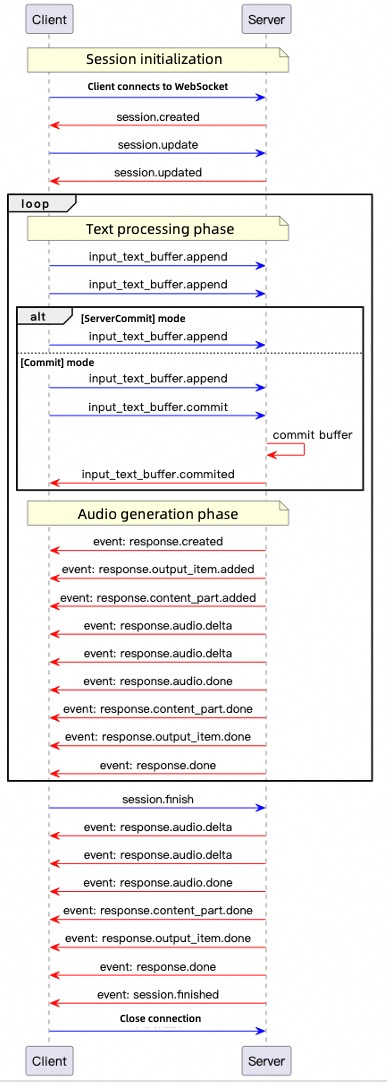
The Realtime API supports two modes:
- Server commit mode: The client sends text only. The server intelligently determines text segmentation and synthesis timing. Use this mode for low-latency scenarios without manual synthesis control, such as GPS navigation.
- Commit mode: Add text to a buffer first, then trigger the server to synthesize the specified text. Use this mode for scenarios requiring fine-grained control over pauses and sentence breaks, such as news broadcasting.
- Server commit mode
- Commit mode
Create another Python file named
Run
server_commit.py in the same directory as tts_realtime_client.py, and copy the following code into the file:server_commit.py
server_commit.py
Copy
import os
import asyncio
import logging
import wave
from tts_realtime_client import TTSRealtimeClient, SessionMode
import pyaudio

# QwenTTS service configuration
# Replace model with qwen3-tts-instruct-flash-realtime and uncomment instructions in tts_realtime_client.py to use instruction control
URL = "wss://dashscope-intl.aliyuncs.com/api-ws/v1/realtime?model=qwen3-tts-flash-realtime"
# Replace with your Qwen Cloud API Key if environment variable is not configured: API_KEY="sk-xxx"
API_KEY = os.getenv("DASHSCOPE_API_KEY")

if not API_KEY:
  raise ValueError("Please set DASHSCOPE_API_KEY environment variable")

# Collect audio data
_audio_chunks = []
# Real-time playback settings
_AUDIO_SAMPLE_RATE = 24000
_audio_pyaudio = pyaudio.PyAudio()
_audio_stream = None  # Will be opened at runtime

def _audio_callback(audio_bytes: bytes):
  """TTSRealtimeClient audio callback: play and cache in real time"""
  global _audio_stream
  if _audio_stream is not None:
    try:
      _audio_stream.write(audio_bytes)
    except Exception as exc:
      logging.error(f"PyAudio playback error: {exc}")
  _audio_chunks.append(audio_bytes)
  logging.info(f"Received audio chunk: {len(audio_bytes)} bytes")

def _save_audio_to_file(filename: str = "output.wav", sample_rate: int = 24000) -> bool:
  """Save collected audio data to WAV file"""
  if not _audio_chunks:
    logging.warning("No audio data to save")
    return False

  try:
    audio_data = b"".join(_audio_chunks)
    with wave.open(filename, 'wb') as wav_file:
      wav_file.setnchannels(1)  # Mono
      wav_file.setsampwidth(2)  # 16-bit
      wav_file.setframerate(sample_rate)
      wav_file.writeframes(audio_data)
    logging.info(f"Audio saved to: {filename}")
    return True
  except Exception as exc:
    logging.error(f"Failed to save audio: {exc}")
    return False

async def _produce_text(client: TTSRealtimeClient):
  """Send text fragments to server"""
  text_fragments = [
    "Qwen Cloud is an all-in-one platform for model development and application building.",
    "Both developers and business personnel can deeply participate in designing and building model applications.",
    "You can develop a model application in just 5 minutes through simple UI operations,",
    "or train a custom model within hours, allowing you to focus more on application innovation.",
  ]

  logging.info("Sending text fragments…")
  for text in text_fragments:
    logging.info(f"Sending fragment: {text}")
    await client.append_text(text)
    await asyncio.sleep(0.1)  # Brief delay between fragments

  # Wait for server to complete internal processing before ending session
  await asyncio.sleep(1.0)
  await client.finish_session()

async def _run_demo():
  """Run complete demo"""
  global _audio_stream
  # Open PyAudio output stream
  _audio_stream = _audio_pyaudio.open(
    format=pyaudio.paInt16,
    channels=1,
    rate=_AUDIO_SAMPLE_RATE,
    output=True,
    frames_per_buffer=1024
  )

  client = TTSRealtimeClient(
    base_url=URL,
    api_key=API_KEY,
    voice="Cherry",
    mode=SessionMode.SERVER_COMMIT,
    audio_callback=_audio_callback
  )

  # Establish connection
  await client.connect()

  # Execute message handling and text sending in parallel
  consumer_task = asyncio.create_task(client.handle_messages())
  producer_task = asyncio.create_task(_produce_text(client))

  await producer_task  # Wait for text sending to complete

  # Wait for response.done
  await client.wait_for_response_done()

  # Close connection and cancel consumer task
  await client.close()
  consumer_task.cancel()

  # Close audio stream
  if _audio_stream is not None:
    _audio_stream.stop_stream()
    _audio_stream.close()
  _audio_pyaudio.terminate()

  # Save audio data
  os.makedirs("outputs", exist_ok=True)
  _save_audio_to_file(os.path.join("outputs", "qwen_tts_output.wav"))

def main():
  """Synchronous entry point"""
  logging.basicConfig(
    level=logging.INFO,
    format='%(asctime)s [%(levelname)s] %(message)s',
    datefmt='%Y-%m-%d %H:%M:%S'
  )
  logging.info("Starting QwenTTS Realtime Client demo…")
  asyncio.run(_run_demo())

if __name__ == "__main__":
  main()
server_commit.py to listen to real-time audio generated by the Realtime API.Create another Python file named
Run
commit.py in the same directory as tts_realtime_client.py, and copy the following code into the file:commit.py
commit.py
Copy
import os
import asyncio
import logging
import wave
from tts_realtime_client import TTSRealtimeClient, SessionMode
import pyaudio

# QwenTTS service configuration
# Replace model with qwen3-tts-instruct-flash-realtime and uncomment instructions in tts_realtime_client.py to use instruction control
URL = "wss://dashscope-intl.aliyuncs.com/api-ws/v1/realtime?model=qwen3-tts-flash-realtime"
# Replace with your Qwen Cloud API Key if environment variable is not configured: API_KEY="sk-xxx"
API_KEY = os.getenv("DASHSCOPE_API_KEY")

if not API_KEY:
  raise ValueError("Please set DASHSCOPE_API_KEY environment variable")

# Collect audio data
_audio_chunks = []
_AUDIO_SAMPLE_RATE = 24000
_audio_pyaudio = pyaudio.PyAudio()
_audio_stream = None

def _audio_callback(audio_bytes: bytes):
  """TTSRealtimeClient audio callback: play and cache in real time"""
  global _audio_stream
  if _audio_stream is not None:
    try:
      _audio_stream.write(audio_bytes)
    except Exception as exc:
      logging.error(f"PyAudio playback error: {exc}")
  _audio_chunks.append(audio_bytes)
  logging.info(f"Received audio chunk: {len(audio_bytes)} bytes")

def _save_audio_to_file(filename: str = "output.wav", sample_rate: int = 24000) -> bool:
  """Save collected audio data to WAV file"""
  if not _audio_chunks:
    logging.warning("No audio data to save")
    return False

  try:
    audio_data = b"".join(_audio_chunks)
    with wave.open(filename, 'wb') as wav_file:
      wav_file.setnchannels(1)  # Mono
      wav_file.setsampwidth(2)  # 16-bit
      wav_file.setframerate(sample_rate)
      wav_file.writeframes(audio_data)
    logging.info(f"Audio saved to: {filename}")
    return True
  except Exception as exc:
    logging.error(f"Failed to save audio: {exc}")
    return False

async def _user_input_loop(client: TTSRealtimeClient):
  """Continuously get user input and send text. When user enters empty text, send commit event and end current session"""
  print("Enter text (press Enter directly to send commit event and end current session, press Ctrl+C or Ctrl+D to exit entire program):")

  while True:
    try:
      user_text = input("> ")
      if not user_text:  # User entered empty input
        # Empty input signifies end of conversation: submit buffer -> end session -> break loop
        logging.info("Empty input, sending commit event and ending current session")
        await client.commit_text_buffer()
        # Wait briefly for server to process commit to prevent losing audio from premature session end
        await asyncio.sleep(0.3)
        await client.finish_session()
        break  # Exit user input loop directly, no need to press Enter again
      else:
        logging.info(f"Sending text: {user_text}")
        await client.append_text(user_text)

    except EOFError:  # User pressed Ctrl+D
      break
    except KeyboardInterrupt:  # User pressed Ctrl+C
      break

  # End session
  logging.info("Ending session...")
async def _run_demo():
  """Run complete demo"""
  global _audio_stream
  # Open PyAudio output stream
  _audio_stream = _audio_pyaudio.open(
    format=pyaudio.paInt16,
    channels=1,
    rate=_AUDIO_SAMPLE_RATE,
    output=True,
    frames_per_buffer=1024
  )

  client = TTSRealtimeClient(
    base_url=URL,
    api_key=API_KEY,
    voice="Cherry",
    mode=SessionMode.COMMIT,  # Change to COMMIT mode
    audio_callback=_audio_callback
  )

  # Establish connection
  await client.connect()

  # Execute message handling and user input in parallel
  consumer_task = asyncio.create_task(client.handle_messages())
  producer_task = asyncio.create_task(_user_input_loop(client))

  await producer_task  # Wait for user input to complete

  # Wait for response.done
  await client.wait_for_response_done()

  # Close connection and cancel consumer task
  await client.close()
  consumer_task.cancel()

  # Close audio stream
  if _audio_stream is not None:
    _audio_stream.stop_stream()
    _audio_stream.close()
  _audio_pyaudio.terminate()

  # Save audio data
  os.makedirs("outputs", exist_ok=True)
  _save_audio_to_file(os.path.join("outputs", "qwen_tts_output.wav"))

def main():
  logging.basicConfig(
    level=logging.INFO,
    format='%(asctime)s [%(levelname)s] %(message)s',
    datefmt='%Y-%m-%d %H:%M:%S'
  )
  logging.info("Starting QwenTTS Realtime Client demo…")
  asyncio.run(_run_demo())

if __name__ == "__main__":
  main()
commit.py to input multiple texts for synthesis. Press Enter without entering text to listen to the audio returned by the Realtime API through your speakers.The voice cloning service does not provide preview audio. Test and evaluate the effect through the speech synthesis interface. Use short text for initial testing.This example adapts the "server commit mode" code, replacing the
voice parameter with a cloned voice.- Key principle: Match the voice cloning model (
target_model) with the speech synthesis model (model). Otherwise, synthesis fails. - The example uses a local audio file
voice.mp3for voice cloning. Replace it when running the code.
- Python
- Java
Copy
# coding=utf-8
# Installation instructions for pyaudio:
# APPLE Mac OS X
#   brew install portaudio
#   pip install pyaudio
# Debian/Ubuntu
#   sudo apt-get install python-pyaudio python3-pyaudio
#   or
#   pip install pyaudio
# CentOS
#   sudo yum install -y portaudio portaudio-devel && pip install pyaudio
# Microsoft Windows
#   python -m pip install pyaudio

import pyaudio
import os
import requests
import base64
import pathlib
import threading
import time
import dashscope  # DashScope Python SDK version must be at least 1.23.9
from dashscope.audio.qwen_tts_realtime import QwenTtsRealtime, QwenTtsRealtimeCallback, AudioFormat

# ======= Constants =======
DEFAULT_TARGET_MODEL = "qwen3-tts-vc-realtime-2026-01-15"  # Use the same model for voice cloning and speech synthesis
DEFAULT_PREFERRED_NAME = "guanyu"
DEFAULT_AUDIO_MIME_TYPE = "audio/mpeg"
VOICE_FILE_PATH = "voice.mp3"  # Relative path to local audio file for voice cloning

TEXT_TO_SYNTHESIZE = [
  'Right? I really love this kind of supermarket,',
  'especially during Chinese New Year',
  'when I go shopping',
  'I feel',
  'super super happy!',
  'I want to buy so many things!'
]

def create_voice(file_path: str,
          target_model: str = DEFAULT_TARGET_MODEL,
          preferred_name: str = DEFAULT_PREFERRED_NAME,
          audio_mime_type: str = DEFAULT_AUDIO_MIME_TYPE) -> str:
  """
  Create voice and return voice parameter
  """
  # Replace with your Qwen Cloud API Key if environment variable is not configured: api_key = "sk-xxx"
  api_key = os.getenv("DASHSCOPE_API_KEY")

  file_path_obj = pathlib.Path(file_path)
  if not file_path_obj.exists():
    raise FileNotFoundError(f"Audio file not found: {file_path}")

  base64_str = base64.b64encode(file_path_obj.read_bytes()).decode()
  data_uri = f"data:{audio_mime_type};base64,{base64_str}"

  url = "https://dashscope-intl.aliyuncs.com/api/v1/services/audio/tts/customization"
  payload = {
    "model": "qwen-voice-enrollment", # Do not modify this value
    "input": {
      "action": "create",
      "target_model": target_model,
      "preferred_name": preferred_name,
      "audio": {"data": data_uri}
    }
  }
  headers = {
    "Authorization": f"Bearer {api_key}",
    "Content-Type": "application/json"
  }

  resp = requests.post(url, json=payload, headers=headers)
  if resp.status_code != 200:
    raise RuntimeError(f"Voice creation failed: {resp.status_code}, {resp.text}")

  try:
    return resp.json()["output"]["voice"]
  except (KeyError, ValueError) as e:
    raise RuntimeError(f"Failed to parse voice response: {e}")

def init_dashscope_api_key():
  """
  Initialize DashScope SDK API key
  """
  # Replace with your Qwen Cloud API Key if environment variable is not configured: dashscope.api_key = "sk-xxx"
  dashscope.api_key = os.getenv("DASHSCOPE_API_KEY")

# ======= Callback class =======
class MyCallback(QwenTtsRealtimeCallback):
  """
  Custom TTS streaming callback
  """
  def __init__(self):
    self.complete_event = threading.Event()
    self._player = pyaudio.PyAudio()
    self._stream = self._player.open(
      format=pyaudio.paInt16, channels=1, rate=24000, output=True
    )

  def on_open(self) -> None:
    print('[TTS] Connection established')

  def on_close(self, close_status_code, close_msg) -> None:
    self._stream.stop_stream()
    self._stream.close()
    self._player.terminate()
    print(f'[TTS] Connection closed code={close_status_code}, msg={close_msg}')

  def on_event(self, response: dict) -> None:
    try:
      event_type = response.get('type', '')
      if event_type == 'session.created':
        print(f'[TTS] Session started: {response["session"]["id"]}')
      elif event_type == 'response.audio.delta':
        audio_data = base64.b64decode(response['delta'])
        self._stream.write(audio_data)
      elif event_type == 'response.done':
        print(f'[TTS] Response completed, Response ID: {qwen_tts_realtime.get_last_response_id()}')
      elif event_type == 'session.finished':
        print('[TTS] Session ended')
        self.complete_event.set()
    except Exception as e:
      print(f'[Error] Error handling callback event: {e}')

  def wait_for_finished(self):
    self.complete_event.wait()

# ======= Main execution logic =======
if __name__ == '__main__':
  init_dashscope_api_key()
  print('[System] Initializing Qwen TTS Realtime ...')

  callback = MyCallback()
  qwen_tts_realtime = QwenTtsRealtime(
    model=DEFAULT_TARGET_MODEL,
    callback=callback,
    url='wss://dashscope-intl.aliyuncs.com/api-ws/v1/realtime'
  )
  qwen_tts_realtime.connect()

  qwen_tts_realtime.update_session(
    voice=create_voice(VOICE_FILE_PATH), # Replace voice parameter with cloned custom voice
    response_format=AudioFormat.PCM_24000HZ_MONO_16BIT,
    mode='server_commit'
  )

  for text_chunk in TEXT_TO_SYNTHESIZE:
    print(f'[Sending text]: {text_chunk}')
    qwen_tts_realtime.append_text(text_chunk)
    time.sleep(0.1)

  qwen_tts_realtime.finish()
  callback.wait_for_finished()

  print(f'[Metric] session_id={qwen_tts_realtime.get_session_id()}, '
          f'first_audio_delay={qwen_tts_realtime.get_first_audio_delay()}s')
You need to import the Gson dependency. If you use Maven or Gradle, add the dependency as follows:
- Maven
- Gradle
Add the following to your
pom.xml:Copy
<!-- https://mvnrepository.com/artifact/com.google.code.gson/gson -->
<dependency>
  <groupId>com.google.code.gson</groupId>
  <artifactId>gson</artifactId>
  <version>2.13.1</version>
</dependency>
Add the following to your
build.gradle:Copy
// https://mvnrepository.com/artifact/com.google.code.gson/gson
implementation("com.google.code.gson:gson:2.13.1")
Copy
import com.alibaba.dashscope.audio.qwen_tts_realtime.*;
import com.alibaba.dashscope.exception.NoApiKeyException;
import com.google.gson.Gson;
import com.google.gson.JsonObject;

import javax.sound.sampled.*;
import java.io.*;
import java.net.HttpURLConnection;
import java.net.URL;
import java.nio.file.*;
import java.nio.charset.StandardCharsets;
import java.util.Base64;
import java.util.Queue;
import java.util.concurrent.CountDownLatch;
import java.util.concurrent.atomic.AtomicReference;
import java.util.concurrent.ConcurrentLinkedQueue;
import java.util.concurrent.atomic.AtomicBoolean;

public class Main {
  // ===== Constants =====
  // Use the same model for voice cloning and speech synthesis
  private static final String TARGET_MODEL = "qwen3-tts-vc-realtime-2026-01-15";
  private static final String PREFERRED_NAME = "guanyu";
  // Relative path to local audio file for voice cloning
  private static final String AUDIO_FILE = "voice.mp3";
  private static final String AUDIO_MIME_TYPE = "audio/mpeg";
  private static String[] textToSynthesize = {
      "Right? I really love this kind of supermarket",
      "especially during Chinese New Year",
      "when I go shopping",
      "I feel",
      "super super happy!",
      "I want to buy so many things!"
  };

  // Generate data URI
  public static String toDataUrl(String filePath) throws IOException {
    byte[] bytes = Files.readAllBytes(Paths.get(filePath));
    String encoded = Base64.getEncoder().encodeToString(bytes);
    return "data:" + AUDIO_MIME_TYPE + ";base64," + encoded;
  }

  // Call API to create voice
  public static String createVoice() throws Exception {
    // Replace with your Qwen Cloud API Key if environment variable is not configured: String apiKey = "sk-xxx"
    String apiKey = System.getenv("DASHSCOPE_API_KEY");

    String jsonPayload =
        "{"
            + "\"model\": \"qwen-voice-enrollment\"," // Do not modify this value
            + "\"input\": {"
            +     "\"action\": \"create\","
            +     "\"target_model\": \"" + TARGET_MODEL + "\","
            +     "\"preferred_name\": \"" + PREFERRED_NAME + "\","
            +     "\"audio\": {"
            +         "\"data\": \"" + toDataUrl(AUDIO_FILE) + "\""
            +     "}"
            + "}"
            + "}";

    HttpURLConnection con = (HttpURLConnection) new URL("https://dashscope-intl.aliyuncs.com/api/v1/services/audio/tts/customization").openConnection();
    con.setRequestMethod("POST");
    con.setRequestProperty("Authorization", "Bearer " + apiKey);
    con.setRequestProperty("Content-Type", "application/json");
    con.setDoOutput(true);

    try (OutputStream os = con.getOutputStream()) {
      os.write(jsonPayload.getBytes(StandardCharsets.UTF_8));
    }

    int status = con.getResponseCode();
    System.out.println("HTTP status code: " + status);

    try (BufferedReader br = new BufferedReader(
        new InputStreamReader(status >= 200 && status < 300 ? con.getInputStream() : con.getErrorStream(),
            StandardCharsets.UTF_8))) {
      StringBuilder response = new StringBuilder();
      String line;
      while ((line = br.readLine()) != null) {
        response.append(line);
      }
      System.out.println("Response content: " + response);

      if (status == 200) {
        JsonObject jsonObj = new Gson().fromJson(response.toString(), JsonObject.class);
        return jsonObj.getAsJsonObject("output").get("voice").getAsString();
      }
      throw new IOException("Voice creation failed: " + status + " - " + response);
    }
  }

  // Real-time PCM audio player class
  public static class RealtimePcmPlayer {
    private int sampleRate;
    private SourceDataLine line;
    private AudioFormat audioFormat;
    private Thread decoderThread;
    private Thread playerThread;
    private AtomicBoolean stopped = new AtomicBoolean(false);
    private Queue<String> b64AudioBuffer = new ConcurrentLinkedQueue<>();
    private Queue<byte[]> RawAudioBuffer = new ConcurrentLinkedQueue<>();

    // Constructor to initialize audio format and audio line
    public RealtimePcmPlayer(int sampleRate) throws LineUnavailableException {
      this.sampleRate = sampleRate;
      this.audioFormat = new AudioFormat(this.sampleRate, 16, 1, true, false);
      DataLine.Info info = new DataLine.Info(SourceDataLine.class, audioFormat);
      line = (SourceDataLine) AudioSystem.getLine(info);
      line.open(audioFormat);
      line.start();
      decoderThread = new Thread(new Runnable() {
        @Override
        public void run() {
          while (!stopped.get()) {
            String b64Audio = b64AudioBuffer.poll();
            if (b64Audio != null) {
              byte[] rawAudio = Base64.getDecoder().decode(b64Audio);
              RawAudioBuffer.add(rawAudio);
            } else {
              try {
                Thread.sleep(100);
              } catch (InterruptedException e) {
                throw new RuntimeException(e);
              }
            }
          }
        }
      });
      playerThread = new Thread(new Runnable() {
        @Override
        public void run() {
          while (!stopped.get()) {
            byte[] rawAudio = RawAudioBuffer.poll();
            if (rawAudio != null) {
              try {
                playChunk(rawAudio);
              } catch (IOException e) {
                throw new RuntimeException(e);
              } catch (InterruptedException e) {
                throw new RuntimeException(e);
              }
            } else {
              try {
                Thread.sleep(100);
              } catch (InterruptedException e) {
                throw new RuntimeException(e);
              }
            }
          }
        }
      });
      decoderThread.start();
      playerThread.start();
    }

    // Play an audio chunk and block until playback completes
    private void playChunk(byte[] chunk) throws IOException, InterruptedException {
      if (chunk == null || chunk.length == 0) return;

      int bytesWritten = 0;
      while (bytesWritten < chunk.length) {
        bytesWritten += line.write(chunk, bytesWritten, chunk.length - bytesWritten);
      }
      int audioLength = chunk.length / (this.sampleRate*2/1000);
      // Wait for audio in buffer to finish playing
      Thread.sleep(audioLength - 10);
    }

    public void write(String b64Audio) {
      b64AudioBuffer.add(b64Audio);
    }

    public void cancel() {
      b64AudioBuffer.clear();
      RawAudioBuffer.clear();
    }

    public void waitForComplete() throws InterruptedException {
      while (!b64AudioBuffer.isEmpty() || !RawAudioBuffer.isEmpty()) {
        Thread.sleep(100);
      }
      line.drain();
    }

    public void shutdown() throws InterruptedException {
      stopped.set(true);
      decoderThread.join();
      playerThread.join();
      if (line != null && line.isRunning()) {
        line.drain();
        line.close();
      }
    }
  }

  public static void main(String[] args) throws Exception {
    QwenTtsRealtimeParam param = QwenTtsRealtimeParam.builder()
        .model(TARGET_MODEL)
        .url("wss://dashscope-intl.aliyuncs.com/api-ws/v1/realtime")
        // Replace with your Qwen Cloud API Key if environment variable is not configured: .apikey("sk-xxx")
        .apikey(System.getenv("DASHSCOPE_API_KEY"))
        .build();
    AtomicReference<CountDownLatch> completeLatch = new AtomicReference<>(new CountDownLatch(1));
    final AtomicReference<QwenTtsRealtime> qwenTtsRef = new AtomicReference<>(null);

    // Create real-time audio player instance
    RealtimePcmPlayer audioPlayer = new RealtimePcmPlayer(24000);

    QwenTtsRealtime qwenTtsRealtime = new QwenTtsRealtime(param, new QwenTtsRealtimeCallback() {
      @Override
      public void onOpen() {
        // Handle connection established
      }
      @Override
      public void onEvent(JsonObject message) {
        String type = message.get("type").getAsString();
        switch(type) {
          case "session.created":
            // Handle session created
            break;
          case "response.audio.delta":
            String recvAudioB64 = message.get("delta").getAsString();
            // Play audio in real time
            audioPlayer.write(recvAudioB64);
            break;
          case "response.done":
            // Handle response completed
            break;
          case "session.finished":
            // Handle session finished
            completeLatch.get().countDown();
          default:
            break;
        }
      }
      @Override
      public void onClose(int code, String reason) {
        // Handle connection closed
      }
    });
    qwenTtsRef.set(qwenTtsRealtime);
    try {
      qwenTtsRealtime.connect();
    } catch (NoApiKeyException e) {
      throw new RuntimeException(e);
    }
    QwenTtsRealtimeConfig config = QwenTtsRealtimeConfig.builder()
        .voice(createVoice()) // Replace voice parameter with cloned custom voice
        .responseFormat(QwenTtsRealtimeAudioFormat.PCM_24000HZ_MONO_16BIT)
        .mode("server_commit")
        .build();
    qwenTtsRealtime.updateSession(config);
    for (String text:textToSynthesize) {
      qwenTtsRealtime.appendText(text);
      Thread.sleep(100);
    }
    qwenTtsRealtime.finish();
    completeLatch.get().await();

    // Wait for audio playback to complete and shut down player
    audioPlayer.waitForComplete();
    audioPlayer.shutdown();
    System.exit(0);
  }
}
The voice design feature returns preview audio data. Listen to this preview audio first to confirm the effect meets your expectations before using it for speech synthesis.
1
Generate a custom voice and preview the result
If you are satisfied with the result, proceed to the next step. Otherwise, generate it again.
- Python
- Java
Copy
import requests
import base64
import os

def create_voice_and_play():
  # If the environment variable is not set, replace the following line with your API key: api_key = "sk-xxx"
  api_key = os.getenv("DASHSCOPE_API_KEY")

  if not api_key:
    print("Error: DASHSCOPE_API_KEY environment variable not found. Please set the API key first.")
    return None, None, None

  # Prepare request data
  headers = {
    "Authorization": f"Bearer {api_key}",
    "Content-Type": "application/json"
  }

  data = {
    "model": "qwen-voice-design",
    "input": {
      "action": "create",
      "target_model": "qwen3-tts-vd-realtime-2026-01-15",
      "voice_prompt": "A composed middle-aged male announcer with a deep, rich and magnetic voice, a steady speaking speed and clear articulation, is suitable for news broadcasting or documentary commentary.",
      "preview_text": "Dear listeners, hello everyone. Welcome to the evening news.",
      "preferred_name": "announcer",
      "language": "en"
    },
    "parameters": {
      "sample_rate": 24000,
      "response_format": "wav"
    }
  }

  url = "https://dashscope-intl.aliyuncs.com/api/v1/services/audio/tts/customization"

  try:
    # Send the request
    response = requests.post(
      url,
      headers=headers,
      json=data,
      timeout=60  # Add a timeout setting
    )

    if response.status_code == 200:
      result = response.json()

      # Get the voice name
      voice_name = result["output"]["voice"]
      print(f"Voice name: {voice_name}")

      # Get the preview audio data
      base64_audio = result["output"]["preview_audio"]["data"]

      # Decode the Base64 audio data
      audio_bytes = base64.b64decode(base64_audio)

      # Save the audio file locally
      filename = f"{voice_name}_preview.wav"

      # Write the audio data to a local file
      with open(filename, 'wb') as f:
        f.write(audio_bytes)

      print(f"Audio saved to local file: {filename}")
      print(f"File path: {os.path.abspath(filename)}")

      return voice_name, audio_bytes, filename
    else:
      print(f"Request failed with status code: {response.status_code}")
      print(f"Response content: {response.text}")
      return None, None, None

  except requests.exceptions.RequestException as e:
    print(f"A network request error occurred: {e}")
    return None, None, None
  except KeyError as e:
    print(f"Response data format error, missing required field: {e}")
    print(f"Response content: {response.text if 'response' in locals() else 'No response'}")
    return None, None, None
  except Exception as e:
    print(f"An unknown error occurred: {e}")
    return None, None, None

if __name__ == "__main__":
  print("Starting to create voice...")
  voice_name, audio_data, saved_filename = create_voice_and_play()

  if voice_name:
    print(f"\nSuccessfully created voice '{voice_name}'")
    print(f"Audio file saved as: '{saved_filename}'")
    print(f"File size: {os.path.getsize(saved_filename)} bytes")
  else:
    print("\nVoice creation failed")
You need to import the Gson dependency. If you are using Maven or Gradle, add the dependency as follows:
- Maven
- Gradle
Add the following content to
pom.xml:Copy
<!-- https://mvnrepository.com/artifact/com.google.code.gson/gson -->
<dependency>
  <groupId>com.google.code.gson</groupId>
  <artifactId>gson</artifactId>
  <version>2.13.1</version>
</dependency>
Add the following content to
build.gradle:Copy
// https://mvnrepository.com/artifact/com.google.code.gson/gson
implementation("com.google.code.gson:gson:2.13.1")
Copy
import com.google.gson.JsonObject;
import com.google.gson.JsonParser;
import java.io.*;
import java.net.HttpURLConnection;
import java.net.URL;
import java.util.Base64;

public class Main {
  public static void main(String[] args) {
    Main example = new Main();
    example.createVoice();
  }

  public void createVoice() {
    // If the environment variable is not set, replace the following line with your API key: String apiKey = "sk-xxx"
    String apiKey = System.getenv("DASHSCOPE_API_KEY");

    // Create the JSON request body string
    String jsonBody = "{\n" +
        "    \"model\": \"qwen-voice-design\",\n" +
        "    \"input\": {\n" +
        "        \"action\": \"create\",\n" +
        "        \"target_model\": \"qwen3-tts-vd-realtime-2026-01-15\",\n" +
        "        \"voice_prompt\": \"A composed middle-aged male announcer with a deep, rich and magnetic voice, a steady speaking speed and clear articulation, is suitable for news broadcasting or documentary commentary.\",\n" +
        "        \"preview_text\": \"Dear listeners, hello everyone. Welcome to the evening news.\",\n" +
        "        \"preferred_name\": \"announcer\",\n" +
        "        \"language\": \"en\"\n" +
        "    },\n" +
        "    \"parameters\": {\n" +
        "        \"sample_rate\": 24000,\n" +
        "        \"response_format\": \"wav\"\n" +
        "    }\n" +
        "}";

    HttpURLConnection connection = null;
    try {
      URL url = new URL("https://dashscope-intl.aliyuncs.com/api/v1/services/audio/tts/customization");
      connection = (HttpURLConnection) url.openConnection();

      // Set the request method and headers
      connection.setRequestMethod("POST");
      connection.setRequestProperty("Authorization", "Bearer " + apiKey);
      connection.setRequestProperty("Content-Type", "application/json");
      connection.setDoOutput(true);
      connection.setDoInput(true);

      // Send the request body
      try (OutputStream os = connection.getOutputStream()) {
        byte[] input = jsonBody.getBytes("UTF-8");
        os.write(input, 0, input.length);
        os.flush();
      }

      // Get the response
      int responseCode = connection.getResponseCode();
      if (responseCode == HttpURLConnection.HTTP_OK) {
        // Read the response content
        StringBuilder response = new StringBuilder();
        try (BufferedReader br = new BufferedReader(
            new InputStreamReader(connection.getInputStream(), "UTF-8"))) {
          String responseLine;
          while ((responseLine = br.readLine()) != null) {
            response.append(responseLine.trim());
          }
        }

        // Parse the JSON response
        JsonObject jsonResponse = JsonParser.parseString(response.toString()).getAsJsonObject();
        JsonObject outputObj = jsonResponse.getAsJsonObject("output");
        JsonObject previewAudioObj = outputObj.getAsJsonObject("preview_audio");

        // Get the voice name
        String voiceName = outputObj.get("voice").getAsString();
        System.out.println("Voice name: " + voiceName);

        // Get the Base64-encoded audio data
        String base64Audio = previewAudioObj.get("data").getAsString();

        // Decode the Base64 audio data
        byte[] audioBytes = Base64.getDecoder().decode(base64Audio);

        // Save the audio to a local file
        String filename = voiceName + "_preview.wav";
        saveAudioToFile(audioBytes, filename);

        System.out.println("Audio saved to local file: " + filename);

      } else {
        // Read the error response
        StringBuilder errorResponse = new StringBuilder();
        try (BufferedReader br = new BufferedReader(
            new InputStreamReader(connection.getErrorStream(), "UTF-8"))) {
          String responseLine;
          while ((responseLine = br.readLine()) != null) {
            errorResponse.append(responseLine.trim());
          }
        }

        System.out.println("Request failed with status code: " + responseCode);
        System.out.println("Error response: " + errorResponse.toString());
      }

    } catch (Exception e) {
      System.err.println("An error occurred during the request: " + e.getMessage());
      e.printStackTrace();
    } finally {
      if (connection != null) {
        connection.disconnect();
      }
    }
  }

  private void saveAudioToFile(byte[] audioBytes, String filename) {
    try {
      File file = new File(filename);
      try (FileOutputStream fos = new FileOutputStream(file)) {
        fos.write(audioBytes);
      }
      System.out.println("Audio saved to: " + file.getAbsolutePath());
    } catch (IOException e) {
      System.err.println("An error occurred while saving the audio file: " + e.getMessage());
      e.printStackTrace();
    }
  }
}
2
Use the custom voice for speech synthesis
This example refers to the "server commit mode" sample code from the DashScope SDK for speech synthesis with a system voice. It replaces the
voice parameter with the custom voice generated by voice design.Key principle: The model used for voice design (target_model) must be the same as the model used for subsequent speech synthesis (model). Otherwise, the synthesis will fail.- Python
- Java
Copy
# coding=utf-8
# Installation instructions for pyaudio:
# APPLE Mac OS X
#   brew install portaudio
#   pip install pyaudio
# Debian/Ubuntu
#   sudo apt-get install python-pyaudio python3-pyaudio
#   or
#   pip install pyaudio
# CentOS
#   sudo yum install -y portaudio portaudio-devel && pip install pyaudio
# Microsoft Windows
#   python -m pip install pyaudio

import pyaudio
import os
import base64
import threading
import time
import dashscope  # DashScope Python SDK version must be 1.23.9 or later
from dashscope.audio.qwen_tts_realtime import QwenTtsRealtime, QwenTtsRealtimeCallback, AudioFormat

# ======= Constant Configuration =======
TEXT_TO_SYNTHESIZE = [
  'Right? I really like this kind of supermarket,',
  'especially during the New Year.',
  'Going to the supermarket',
  'just makes me feel',
  'super, super happy!',
  'I want to buy so many things!'
]

def init_dashscope_api_key():
  """
  Initialize the API key for the DashScope SDK.
  """
  # If the environment variable is not set, replace the following line with your API key: dashscope.api_key = "sk-xxx"
  dashscope.api_key = os.getenv("DASHSCOPE_API_KEY")

# ======= Callback Class =======
class MyCallback(QwenTtsRealtimeCallback):
  """
  Custom TTS streaming callback.
  """
  def __init__(self):
    self.complete_event = threading.Event()
    self._player = pyaudio.PyAudio()
    self._stream = self._player.open(
      format=pyaudio.paInt16, channels=1, rate=24000, output=True
    )

  def on_open(self) -> None:
    print('[TTS] Connection established')

  def on_close(self, close_status_code, close_msg) -> None:
    self._stream.stop_stream()
    self._stream.close()
    self._player.terminate()
    print(f'[TTS] Connection closed, code={close_status_code}, msg={close_msg}')

  def on_event(self, response: dict) -> None:
    try:
      event_type = response.get('type', '')
      if event_type == 'session.created':
        print(f'[TTS] Session started: {response["session"]["id"]}')
      elif event_type == 'response.audio.delta':
        audio_data = base64.b64decode(response['delta'])
        self._stream.write(audio_data)
      elif event_type == 'response.done':
        print(f'[TTS] Response complete, Response ID: {qwen_tts_realtime.get_last_response_id()}')
      elif event_type == 'session.finished':
        print('[TTS] Session finished')
        self.complete_event.set()
    except Exception as e:
      print(f'[Error] Exception processing callback event: {e}')

  def wait_for_finished(self):
    self.complete_event.wait()

# ======= Main Execution Logic =======
if __name__ == '__main__':
  init_dashscope_api_key()
  print('[System] Initializing Qwen TTS Realtime ...')

  callback = MyCallback()
  qwen_tts_realtime = QwenTtsRealtime(
    # Use the same model for voice design and speech synthesis
    model="qwen3-tts-vd-realtime-2026-01-15",
    callback=callback,
    url='wss://dashscope-intl.aliyuncs.com/api-ws/v1/realtime'
  )
  qwen_tts_realtime.connect()

  qwen_tts_realtime.update_session(
    voice="myvoice", # Replace the voice parameter with the custom voice generated by voice design
    response_format=AudioFormat.PCM_24000HZ_MONO_16BIT,
    mode='server_commit'
  )

  for text_chunk in TEXT_TO_SYNTHESIZE:
    print(f'[Sending text]: {text_chunk}')
    qwen_tts_realtime.append_text(text_chunk)
    time.sleep(0.1)

  qwen_tts_realtime.finish()
  callback.wait_for_finished()

  print(f'[Metric] session_id={qwen_tts_realtime.get_session_id()}, '
          f'first_audio_delay={qwen_tts_realtime.get_first_audio_delay()}s')
Copy
import com.alibaba.dashscope.audio.qwen_tts_realtime.*;
import com.alibaba.dashscope.exception.NoApiKeyException;
import com.google.gson.JsonObject;

import javax.sound.sampled.*;
import java.io.*;
import java.util.Base64;
import java.util.Queue;
import java.util.concurrent.CountDownLatch;
import java.util.concurrent.atomic.AtomicReference;
import java.util.concurrent.ConcurrentLinkedQueue;
import java.util.concurrent.atomic.AtomicBoolean;

public class Main {
  // ===== Constant Definitions =====
  private static String[] textToSynthesize = {
      "Right? I really like this kind of supermarket,",
      "especially during the New Year.",
      "Going to the supermarket",
      "just makes me feel",
      "super, super happy!",
      "I want to buy so many things!"
  };

  // Real-time audio player class
  public static class RealtimePcmPlayer {
    private int sampleRate;
    private SourceDataLine line;
    private AudioFormat audioFormat;
    private Thread decoderThread;
    private Thread playerThread;
    private AtomicBoolean stopped = new AtomicBoolean(false);
    private Queue<String> b64AudioBuffer = new ConcurrentLinkedQueue<>();
    private Queue<byte[]> RawAudioBuffer = new ConcurrentLinkedQueue<>();

    // Constructor initializes audio format and audio line
    public RealtimePcmPlayer(int sampleRate) throws LineUnavailableException {
      this.sampleRate = sampleRate;
      this.audioFormat = new AudioFormat(this.sampleRate, 16, 1, true, false);
      DataLine.Info info = new DataLine.Info(SourceDataLine.class, audioFormat);
      line = (SourceDataLine) AudioSystem.getLine(info);
      line.open(audioFormat);
      line.start();
      decoderThread = new Thread(new Runnable() {
        @Override
        public void run() {
          while (!stopped.get()) {
            String b64Audio = b64AudioBuffer.poll();
            if (b64Audio != null) {
              byte[] rawAudio = Base64.getDecoder().decode(b64Audio);
              RawAudioBuffer.add(rawAudio);
            } else {
              try {
                Thread.sleep(100);
              } catch (InterruptedException e) {
                throw new RuntimeException(e);
              }
            }
          }
        }
      });
      playerThread = new Thread(new Runnable() {
        @Override
        public void run() {
          while (!stopped.get()) {
            byte[] rawAudio = RawAudioBuffer.poll();
            if (rawAudio != null) {
              try {
                playChunk(rawAudio);
              } catch (IOException e) {
                throw new RuntimeException(e);
              } catch (InterruptedException e) {
                throw new RuntimeException(e);
              }
            } else {
              try {
                Thread.sleep(100);
              } catch (InterruptedException e) {
                throw new RuntimeException(e);
              }
            }
          }
        }
      });
      decoderThread.start();
      playerThread.start();
    }

    // Plays an audio chunk and blocks until playback is complete
    private void playChunk(byte[] chunk) throws IOException, InterruptedException {
      if (chunk == null || chunk.length == 0) return;

      int bytesWritten = 0;
      while (bytesWritten < chunk.length) {
        bytesWritten += line.write(chunk, bytesWritten, chunk.length - bytesWritten);
      }
      int audioLength = chunk.length / (this.sampleRate*2/1000);
      // Wait for the audio in the buffer to finish playing
      Thread.sleep(audioLength - 10);
    }

    public void write(String b64Audio) {
      b64AudioBuffer.add(b64Audio);
    }

    public void cancel() {
      b64AudioBuffer.clear();
      RawAudioBuffer.clear();
    }

    public void waitForComplete() throws InterruptedException {
      while (!b64AudioBuffer.isEmpty() || !RawAudioBuffer.isEmpty()) {
        Thread.sleep(100);
      }
      line.drain();
    }

    public void shutdown() throws InterruptedException {
      stopped.set(true);
      decoderThread.join();
      playerThread.join();
      if (line != null && line.isRunning()) {
        line.drain();
        line.close();
      }
    }
  }

  public static void main(String[] args) throws Exception {
    QwenTtsRealtimeParam param = QwenTtsRealtimeParam.builder()
        // Use the same model for voice design and speech synthesis
        .model("qwen3-tts-vd-realtime-2026-01-15")
        .url("wss://dashscope-intl.aliyuncs.com/api-ws/v1/realtime")
        // If the environment variable is not set, replace the following line with your API key: .apikey("sk-xxx")
        .apikey(System.getenv("DASHSCOPE_API_KEY"))
        .build();
    AtomicReference<CountDownLatch> completeLatch = new AtomicReference<>(new CountDownLatch(1));
    final AtomicReference<QwenTtsRealtime> qwenTtsRef = new AtomicReference<>(null);

    // Create a real-time audio player instance
    RealtimePcmPlayer audioPlayer = new RealtimePcmPlayer(24000);

    QwenTtsRealtime qwenTtsRealtime = new QwenTtsRealtime(param, new QwenTtsRealtimeCallback() {
      @Override
      public void onOpen() {
        // Handling for when the connection is established
      }
      @Override
      public void onEvent(JsonObject message) {
        String type = message.get("type").getAsString();
        switch(type) {
          case "session.created":
            // Handling for when the session is created
            break;
          case "response.audio.delta":
            String recvAudioB64 = message.get("delta").getAsString();
            // Play audio in real time
            audioPlayer.write(recvAudioB64);
            break;
          case "response.done":
            // Handling for when the response is complete
            break;
          case "session.finished":
            // Handling for when the session is finished
            completeLatch.get().countDown();
          default:
            break;
        }
      }
      @Override
      public void onClose(int code, String reason) {
        // Handling for when the connection is closed
      }
    });
    qwenTtsRef.set(qwenTtsRealtime);
    try {
      qwenTtsRealtime.connect();
    } catch (NoApiKeyException e) {
      throw new RuntimeException(e);
    }
    QwenTtsRealtimeConfig config = QwenTtsRealtimeConfig.builder()
        .voice("myvoice") // Replace the voice parameter with the custom voice generated by voice design
        .responseFormat(QwenTtsRealtimeAudioFormat.PCM_24000HZ_MONO_16BIT)
        .mode("server_commit")
        .build();
    qwenTtsRealtime.updateSession(config);
    for (String text:textToSynthesize) {
      qwenTtsRealtime.appendText(text);
      Thread.sleep(100);
    }
    qwenTtsRealtime.finish();
    completeLatch.get().await();

    // Wait for audio playback to complete and shut down the player
    audioPlayer.waitForComplete();
    audioPlayer.shutdown();
    System.exit(0);
  }
}
Interaction flow
- CosyVoice
- Qwen-TTS-Realtime
CosyVoice uses a WebSocket-based streaming protocol. For protocol details, see the CosyVoice WebSocket API reference.
Connect to the API
To use Qwen-TTS-Realtime, establish a WebSocket connection with the following parameters:| Parameter | Value |
|---|---|
| WebSocket URL | wss://dashscope-intl.aliyuncs.com/api-ws/v1/realtime?model=<model_name> |
| Authentication | Bearer token in the Authorization header |
| Model parameter | Replace <model_name> with a supported model. See Supported models for the list. |
Copy
# Example connection URL
wss://dashscope-intl.aliyuncs.com/api-ws/v1/realtime?model=qwen3-tts-flash-realtime
- Server commit mode
- Commit mode
Set the
session.mode property of the session.update event to "server_commit" to enable this mode. The server intelligently handles text segmentation and synthesis timing.Interaction flow:- Client sends
session.updateevent. Server responds withsession.createdandsession.updatedevents. - Client sends
input_text_buffer.appendevent to append text to the server buffer. - Server intelligently handles text segmentation and synthesis timing, returning
response.created,response.output_item.added,response.content_part.added, andresponse.audio.deltaevents. - After completing the response, the server returns
response.audio.done,response.content_part.done,response.output_item.done, andresponse.done. - The server responds with
session.finishedto end the session.
| Lifecycle | Client events | Server events |
|---|---|---|
| Session initialization | session.update Session configuration | session.created Session created |
session.updated Session configuration updated | ||
| User text input | input_text_buffer.append Add text to server | |
input_text_buffer.commit Immediately synthesize server-cached text | ||
session.finish Notify server no more text input | input_text_buffer.committed Server received submitted text | |
| Server audio output | None | response.created Server starts generating response |
response.output_item.added New output content in response | ||
response.content_part.added New output content added to assistant message | ||
response.audio.delta Incremental audio generated by model | ||
response.content_part.done Text or audio content stream for assistant message completed | ||
response.output_item.done Entire output item stream for assistant message completed | ||
response.audio.done Audio generation completed | ||
response.done Response completed |
Set the
session.mode property of the session.update event to "commit" to enable this mode. The client must actively submit the text buffer to the server to obtain a response.Interaction flow:- Client sends
session.updateevent. Server responds withsession.createdandsession.updatedevents. - Client sends
input_text_buffer.appendevent to append text to the server buffer. - Client sends
input_text_buffer.commitevent to submit the buffer to the server, and sends asession.finishevent to indicate no more text input. - The server responds with
response.created, starting response generation. - The server responds with
response.output_item.added,response.content_part.added, andresponse.audio.deltaevents. - After completing the response, the server returns
response.audio.done,response.content_part.done,response.output_item.done, andresponse.done. - The server responds with
session.finishedto end the session.
| Lifecycle | Client events | Server events |
|---|---|---|
| Session initialization | session.update Session configuration | session.created Session created |
session.updated Session configuration updated | ||
| User text input | input_text_buffer.append Add text to buffer | |
input_text_buffer.commit Submit buffer to server | ||
input_text_buffer.clear Clear buffer | input_text_buffer.committed Server received submitted text | |
| Server audio output | None | response.created Server starts generating response |
response.output_item.added New output content in response | ||
response.content_part.added New output content added to assistant message | ||
response.audio.delta Incremental audio generated by model | ||
response.content_part.done Text or audio content stream for assistant message completed | ||
response.output_item.done Entire output item stream for assistant message completed | ||
response.audio.done Audio generation completed | ||
response.done Response completed |
Instruction control
- CosyVoice
- Qwen-TTS-Realtime
CosyVoice supports instruction control only for cosyvoice-v3-flash. Use SSML for fine-grained pronunciation and prosody control with other CosyVoice models.
Control tone, speed, emotion, and voice characteristics using natural language descriptions instead of audio parameters.
Examples:
- Supported models: Supported only by Qwen3-TTS-Instruct-Flash-Realtime models.
- Usage: Specify instruction content using the
instructionsparameter, such as: "Speak quickly with a noticeably rising intonation, suitable for introducing fashion products." - Supported languages: Description text supports Chinese and English only.
- Length limit: Must not exceed 1600 tokens.
- Audiobook and radio drama dubbing
- Advertising and promotional video dubbing
- Game character and animation dubbing
- Emotionally Intelligent Voice Assistant
- Documentary and news broadcasting
- Be specific, not vague: Use words that describe concrete voice characteristics, such as "deep," "crisp," or "fast-paced." Avoid subjective terms lacking information, such as "nice-sounding" or "ordinary."
- Be multidimensional, not single-dimensional: Good descriptions typically combine multiple dimensions (as described below: pitch, speed, emotion, and so on). Single-dimensional descriptions (such as just "high-pitched") are too broad to generate distinctive effects.
- Be objective, not subjective: Focus on the physical and perceptual characteristics of the voice itself, not personal preferences. For example, you can use "slightly high-pitched with energy" instead of "my favorite voice."
- Be original, not imitative: Describe voice characteristics rather than requesting imitation of specific people (such as celebrities or actors). Such requests involve copyright risks, and the model does not support direct imitation.
- Be concise, not redundant: Ensure every word has meaning. Avoid repeating synonyms or using meaningless intensifiers (such as "very very great voice").
| Dimension | Description examples |
|---|---|
| Pitch | High, medium, low, slightly high, slightly low |
| Speed | Fast, medium, slow, slightly fast, slightly slow |
| Emotion | Cheerful, composed, gentle, serious, lively, calm, soothing |
| Characteristics | Magnetic, crisp, husky, mellow, sweet, rich, powerful |
| Purpose | News broadcasting, advertising voiceover, audiobooks, animation characters, voice assistants, documentary narration |
- Standard broadcasting style: Clear and precise pronunciation, perfect articulation
- Emotional progression effect: Volume quickly increases from normal conversation to shouting, straightforward personality, easily excited and expressive
- Special emotional state: Slightly muffled pronunciation due to crying, slightly hoarse, with obvious tension from crying
- Advertising voiceover style: Slightly high pitch, medium speed, full of energy and appeal, suitable for advertising
- Gentle and soothing style: Slightly slow speed, gentle and sweet tone, caring and warm like a close friend
Voice customization
- CosyVoice
- Qwen-TTS-Realtime
Voice cloning: Input audio formats
High-quality input audio is the foundation for achieving excellent cloning results.| Item | Requirements |
|---|---|
| Supported formats | WAV (16-bit), MP3, M4A |
| Audio duration | Recommended: 10 to 20 seconds. Maximum: 60 seconds. |
| File size | ≤ 10 MB |
| Sample rate | ≥ 16 kHz |
| Sound channel | Mono or stereo. For stereo audio, only the first channel is processed. Make sure that the first channel contains a clear human voice. |
| Content | The audio must contain at least 5 seconds of continuous, clear speech without background sound. The rest of the audio can have only short pauses (≤ 2 seconds). The entire audio segment should be free of background music, noise, or other voices to ensure high-quality core speech content. Use normal spoken audio as input. Do not upload songs or singing audio to ensure accuracy and usability of the cloning effect. |
Voice design: Write high-quality voice descriptions
Limitations
When writing voice descriptions (voice_prompt), follow these technical constraints:- Length limit: The content of
voice_promptmust not exceed 500 characters. - Supported languages: The description text supports only Chinese and English.
Core principles
Thevoice_prompt guides the model to generate voices with specific characteristics.Follow these core principles when describing voices:- Be specific, not vague: Use words that describe concrete sound qualities, such as "deep," "crisp," or "fast-paced." Avoid subjective, uninformative terms such as "nice-sounding" or "ordinary."
- Be multidimensional, not single-dimensional: Excellent descriptions typically combine multiple dimensions, such as gender, age, and emotion. Single-dimensional descriptions, such as "female voice," are too broad to generate distinctive voices.
- Be objective, not subjective: Focus on the physical and perceptual characteristics of the sound itself, not your personal preferences. For example, use "high-pitched with energetic delivery" instead of "my favorite voice."
- Be original, not imitative: Describe sound characteristics rather than requesting imitation of specific individuals, such as celebrities or actors. Such requests pose copyright risks, and the model does not support direct imitation.
- Be concise, not redundant: Ensure every word adds meaning. Avoid repeating synonyms or using meaningless intensifiers, such as "very very nice voice."
Dimension example
| Dimension | Example |
|---|---|
| Gender | Male, female, neutral |
| Age | Child (5-12 years), teenager (13-18 years), young adult (19-35 years), middle-aged (36-55 years), senior (55+ years) |
| Pitch | High, medium, low, slightly high, slightly low |
| Speech rate | Fast, medium, slow, slightly fast, slightly slow |
| Emotion | Cheerful, calm, gentle, serious, lively, cool, soothing |
| Characteristics | Magnetic, crisp, raspy, mellow, sweet, rich, powerful |
| Purpose | News broadcasting, advertisement voice-over, audiobooks, animated characters, voice assistants, documentary narration |
Example comparison
Good cases:- "Young and lively female voice, fast speech rate with noticeable rising intonation, suitable for introducing fashion products."
- Analysis: This description combines age, personality, speech rate, and intonation, and specifies the use case, creating a clear voice profile.
- "Calm middle-aged male, slow speech rate, deep and magnetic voice quality, suitable for reading news or documentary narration."
- Analysis: This description clearly defines gender, age range, speech rate, voice quality, and intended use.
- "Cute child's voice, approximately 8-year-old girl, slightly childish speech, suitable for animated character dubbing."
- Analysis: This description pinpoints the specific age and voice quality (childishness) and has a clear purpose.
- "Gentle and intellectual female, around 30 years old, calm tone, suitable for audiobook narration."
- Analysis: This description effectively conveys voice emotion and style through terms such as "intellectual" and "calm."
| Bad case | Main issue | Improvement suggestion |
|---|---|---|
| 'Nice-sounding voice' | This description is too vague and subjective, and lacks actionable detail. | Add specific dimensions, such as "Clear-toned young female voice with gentle intonation." |
| 'Voice like a celebrity' | This poses a copyright risk. The model does not support direct imitation. | Extract the voice characteristics for the description, such as "Mature, magnetic, steady-paced male voice." |
| 'Very very very nice female voice' | This description is redundant. Repeating words does not help define the voice. | Remove repetitions and add effective descriptions, such as "A 20- to 24-year-old female voice with a light, cheerful tone, lively pitch, and sweet quality." |
| 123456 | This is an invalid input. It cannot be parsed as voice characteristics. | Provide a meaningful text description. For more information, see the recommended examples above. |
Qwen3-TTS supports both voice cloning (Qwen3-TTS-VC) and voice design (Qwen3-TTS-VD). See Voice cloning for the voice cloning guide.
API reference
- CosyVoice
- Qwen-TTS-Realtime
Model comparison
- CosyVoice
- Qwen-TTS-Realtime
| Feature | cosyvoice-v3-plus | cosyvoice-v3-flash |
|---|---|---|
| Supported languages | Varies by system voice: Chinese (Mandarin, Northeastern, Minnan, Shaanxi), English, Japanese, Korean | Varies by system voice: Chinese (Mandarin), English |
| Audio format | pcm, wav, mp3, opus | pcm, wav, mp3, opus |
| Audio sample rate | 8 kHz, 16 kHz, 22.05 kHz, 24 kHz, 44.1 kHz, 48 kHz | 8 kHz, 16 kHz, 22.05 kHz, 24 kHz, 44.1 kHz, 48 kHz |
| Voice cloning | Not supported | Not supported |
| Voice design | Not supported | Not supported |
| SSML | Supported. This feature applies to cloned voices and system voices in the Voice list marked as supporting SSML. For usage instructions, see SSML | Supported. This feature applies to cloned voices and system voices in the Voice list marked as supporting SSML. For usage instructions, see SSML |
| LaTeX | Supported. For usage instructions, see LaTeX formula-to-speech | Supported. For usage instructions, see LaTeX formula-to-speech |
| Volume adjustment | Supported. See request parameter volume | Supported. See request parameter volume |
| Speech rate adjustment | Supported. See request parameter speech_rate. In the Java SDK, this parameter is speechRate | Supported. See request parameter speech_rate. In the Java SDK, this parameter is speechRate |
| Pitch adjustment | Supported. See the request parameter pitch_rate. In the Java SDK, this parameter is pitchRate | Supported. See the request parameter pitch_rate. In the Java SDK, this parameter is pitchRate |
| Bitrate adjustment | Supported. Only the opus audio format supports this feature. See the request parameter bit_rate. In the Java SDK, use .parameter("bit_rate", value) | Supported. Only the opus audio format supports this feature. See the request parameter bit_rate. In the Java SDK, use .parameter("bit_rate", value) |
| Timestamp | Supported. Disabled by default but can be enabled. This feature applies to cloned voices and system voices in the Voice list marked as supporting timestamps. See request parameter word_timestamp_enabled. In the Java SDK, this parameter is enableWordTimestamp | Supported. Disabled by default but can be enabled. This feature applies to cloned voices and system voices in the Voice list marked as supporting timestamps. See request parameter word_timestamp_enabled. In the Java SDK, this parameter is enableWordTimestamp |
| Instruction control (Instruct) | Not supported | Supported. This feature applies to system voices in the Voice list marked as supporting Instruct. See request parameter instruction |
| Streaming input | Supported | Supported |
| Streaming output | Supported | Supported |
| Rate limits (RPS) | 3 | 3 |
| Connection type | Java/Python SDK, WebSocket API | Java/Python SDK, WebSocket API |
| Price | $0.26 per 10,000 characters | $0.13 per 10,000 characters |
| Feature | Qwen3-TTS-Instruct-Flash-Realtime | Qwen3-TTS-VD-Realtime | Qwen3-TTS-VC-Realtime | Qwen3-TTS-Flash-Realtime | Qwen-TTS-Realtime |
|---|---|---|---|---|---|
| Supported languages | Chinese (Mandarin), English, Spanish, Russian, Italian, French, Korean, Japanese, German, Portuguese | Chinese (Mandarin), English, Spanish, Russian, Italian, French, Korean, Japanese, German, Portuguese | Chinese (Mandarin), English, Spanish, Russian, Italian, French, Korean, Japanese, German, Portuguese | Chinese (Mandarin, Beijing, Shanghai, Sichuan, Nanjing, Shaanxi, Minnan, Tianjin, Cantonese, varies by voice), English, Spanish, Russian, Italian, French, Korean, Japanese, German, Portuguese | Chinese, English |
| Audio formats | pcm, wav, mp3, opus | pcm, wav, mp3, opus | pcm, wav, mp3, opus | pcm, wav, mp3, opus | pcm |
| Audio sample rates | 8kHz, 16kHz, 24kHz, 48kHz | 8kHz, 16kHz, 24kHz, 48kHz | 8kHz, 16kHz, 24kHz, 48kHz | 8kHz, 16kHz, 24kHz, 48kHz | 24kHz |
| Voice cloning | Not supported | Not supported | Supported | Not supported | Not supported |
| Voice design | Not supported | Supported | Not supported | Not supported | Not supported |
| SSML | Not supported | Not supported | Not supported | Not supported | Not supported |
| LaTeX | Not supported | Not supported | Not supported | Not supported | Not supported |
| Volume adjustment | Supported | Supported | Supported | Supported | Not supported |
| Speed adjustment | Supported | Supported | Supported | Supported | Not supported |
| Pitch adjustment | Supported | Supported | Supported | Supported | Not supported |
| Bitrate adjustment | Supported | Supported | Supported | Supported | Not supported |
| Timestamps | Not supported | Not supported | Not supported | Not supported | Not supported |
| Instruct | Supported | Not supported | Not supported | Not supported | Not supported |
| Streaming input | Supported | Supported | Supported | Supported | Supported |
| Streaming output | Supported | Supported | Supported | Supported | Supported |
| Rate limits | Requests per minute (RPM): 180 | Requests per minute (RPM): 180 | Requests per minute (RPM): 180 | qwen3-tts-flash-realtime, qwen3-tts-flash-realtime-2025-11-27 RPM: 180; qwen3-tts-flash-realtime-2025-09-18 RPM: 10 | RPM: 10; Tokens per minute (TPM): 100,000 |
| Access methods | Java/Python SDK, WebSocket API | Java/Python SDK, WebSocket API | Java/Python SDK, WebSocket API | Java/Python SDK, WebSocket API | Java/Python SDK, WebSocket API |
| Pricing | $0.143 per 10,000 characters | $0.143353 per 10,000 characters | $0.143353 per 10,000 characters | $0.13 per 10,000 characters | N/A |
System voices
- CosyVoice
- Qwen-TTS-Realtime
Different models support different voices. Set the
voice request parameter to the value listed in the voice parameter column of the voice list when making a request.voice parameter | Details | Supported languages | Supported models |
|---|---|---|---|
| Cherry | Voice name: Cherry. A sunny, positive, friendly, and natural young woman (female) | Chinese (Mandarin), English, French, German, Russian, Italian, Spanish, Portuguese, Japanese, Korean | Qwen3-TTS-Instruct-Flash-Realtime: qwen3-tts-instruct-flash-realtime, qwen3-tts-instruct-flash-realtime-2026-01-22; Qwen3-TTS-Flash-Realtime: qwen3-tts-flash-realtime, qwen3-tts-flash-realtime-2025-11-27, qwen3-tts-flash-realtime-2025-09-18; Qwen-TTS-Realtime: qwen-tts-realtime |
| Serena | Voice name: Serena. A gentle young woman (female) | Chinese (Mandarin), English, French, German, Russian, Italian, Spanish, Portuguese, Japanese, Korean | Qwen3-TTS-Instruct-Flash-Realtime: qwen3-tts-instruct-flash-realtime, qwen3-tts-instruct-flash-realtime-2026-01-22; Qwen3-TTS-Flash-Realtime: qwen3-tts-flash-realtime, qwen3-tts-flash-realtime-2025-11-27; Qwen-TTS-Realtime: qwen-tts-realtime |
| Ethan | Voice name: Ethan. Standard Mandarin with a slight northern accent. Sunny, warm, energetic, and vibrant (male) | Chinese (Mandarin), English, French, German, Russian, Italian, Spanish, Portuguese, Japanese, Korean | Qwen3-TTS-Instruct-Flash-Realtime: qwen3-tts-instruct-flash-realtime, qwen3-tts-instruct-flash-realtime-2026-01-22; Qwen3-TTS-Flash-Realtime: qwen3-tts-flash-realtime, qwen3-tts-flash-realtime-2025-11-27, qwen3-tts-flash-realtime-2025-09-18; Qwen-TTS-Realtime: qwen-tts-realtime |
| Chelsie | Voice name: Chelsie. A two-dimensional virtual girlfriend (female) | Chinese (Mandarin), English, French, German, Russian, Italian, Spanish, Portuguese, Japanese, Korean | Qwen3-TTS-Instruct-Flash-Realtime: qwen3-tts-instruct-flash-realtime, qwen3-tts-instruct-flash-realtime-2026-01-22; Qwen3-TTS-Flash-Realtime: qwen3-tts-flash-realtime, qwen3-tts-flash-realtime-2025-11-27; Qwen-TTS-Realtime: qwen-tts-realtime |
| Momo | Voice name: Momo. Playful and mischievous, cheering you up (female) | Chinese (Mandarin), English, French, German, Russian, Italian, Spanish, Portuguese, Japanese, Korean | Qwen3-TTS-Instruct-Flash-Realtime: qwen3-tts-instruct-flash-realtime, qwen3-tts-instruct-flash-realtime-2026-01-22; Qwen3-TTS-Flash-Realtime: qwen3-tts-flash-realtime, qwen3-tts-flash-realtime-2025-11-27 |
| Vivian | Voice name: Vivian. Confident, cute, and slightly feisty (female) | Chinese (Mandarin), English, French, German, Russian, Italian, Spanish, Portuguese, Japanese, Korean | Qwen3-TTS-Instruct-Flash-Realtime: qwen3-tts-instruct-flash-realtime, qwen3-tts-instruct-flash-realtime-2026-01-22; Qwen3-TTS-Flash-Realtime: qwen3-tts-flash-realtime, qwen3-tts-flash-realtime-2025-11-27 |
| Moon | Voice name: Moon. A bold and handsome man named Yuebai (male) | Chinese (Mandarin), English, French, German, Russian, Italian, Spanish, Portuguese, Japanese, Korean | Qwen3-TTS-Instruct-Flash-Realtime: qwen3-tts-instruct-flash-realtime, qwen3-tts-instruct-flash-realtime-2026-01-22; Qwen3-TTS-Flash-Realtime: qwen3-tts-flash-realtime, qwen3-tts-flash-realtime-2025-11-27 |
| Maia | Voice name: Maia. A blend of intellect and gentleness (female) | Chinese (Mandarin), English, French, German, Russian, Italian, Spanish, Portuguese, Japanese, Korean | Qwen3-TTS-Instruct-Flash-Realtime: qwen3-tts-instruct-flash-realtime, qwen3-tts-instruct-flash-realtime-2026-01-22; Qwen3-TTS-Flash-Realtime: qwen3-tts-flash-realtime, qwen3-tts-flash-realtime-2025-11-27 |
| Kai | Voice name: Kai. A soothing audio spa for your ears (male) | Chinese (Mandarin), English, French, German, Russian, Italian, Spanish, Portuguese, Japanese, Korean | Qwen3-TTS-Instruct-Flash-Realtime: qwen3-tts-instruct-flash-realtime, qwen3-tts-instruct-flash-realtime-2026-01-22; Qwen3-TTS-Flash-Realtime: qwen3-tts-flash-realtime, qwen3-tts-flash-realtime-2025-11-27 |
| Nofish | Voice name: Nofish. A designer who cannot pronounce retroflex sounds (male) | Chinese (Mandarin), English, French, German, Russian, Italian, Spanish, Portuguese, Japanese, Korean | Qwen3-TTS-Instruct-Flash-Realtime: qwen3-tts-instruct-flash-realtime, qwen3-tts-instruct-flash-realtime-2026-01-22; Qwen3-TTS-Flash-Realtime: qwen3-tts-flash-realtime, qwen3-tts-flash-realtime-2025-11-27, qwen3-tts-flash-realtime-2025-09-18 |
| Bella | Voice name: Bella. A little girl who drinks but never throws punches when drunk (female) | Chinese (Mandarin), English, French, German, Russian, Italian, Spanish, Portuguese, Japanese, Korean | Qwen3-TTS-Instruct-Flash-Realtime: qwen3-tts-instruct-flash-realtime, qwen3-tts-instruct-flash-realtime-2026-01-22; Qwen3-TTS-Flash-Realtime: qwen3-tts-flash-realtime, qwen3-tts-flash-realtime-2025-11-27 |
| Jennifer | Voice name: Jennifer. A premium, cinematic-quality American English female voice (female) | Chinese (Mandarin), English, French, German, Russian, Italian, Spanish, Portuguese, Japanese, Korean | Qwen3-TTS-Flash-Realtime: qwen3-tts-flash-realtime, qwen3-tts-flash-realtime-2025-11-27, qwen3-tts-flash-realtime-2025-09-18 |
| Ryan | Voice name: Ryan. Full of rhythm, bursting with dramatic flair, balancing authenticity and tension (male) | Chinese (Mandarin), English, French, German, Russian, Italian, Spanish, Portuguese, Japanese, Korean | Qwen3-TTS-Flash-Realtime: qwen3-tts-flash-realtime, qwen3-tts-flash-realtime-2025-11-27, qwen3-tts-flash-realtime-2025-09-18 |
| Katerina | Voice name: Katerina. A mature-woman voice with rich, memorable rhythm (female) | Chinese (Mandarin), English, French, German, Russian, Italian, Spanish, Portuguese, Japanese, Korean | Qwen3-TTS-Flash-Realtime: qwen3-tts-flash-realtime, qwen3-tts-flash-realtime-2025-11-27, qwen3-tts-flash-realtime-2025-09-18 |
| Aiden | Voice name: Aiden. An American English young man skilled in cooking (male) | Chinese (Mandarin), English, French, German, Russian, Italian, Spanish, Portuguese, Japanese, Korean | Qwen3-TTS-Flash-Realtime: qwen3-tts-flash-realtime, qwen3-tts-flash-realtime-2025-11-27 |
| Eldric Sage | Voice name: Eldric Sage. A calm and wise elder -- weathered like a pine tree, yet clear-minded as a mirror (male) | Chinese (Mandarin), English, French, German, Russian, Italian, Spanish, Portuguese, Japanese, Korean | Qwen3-TTS-Instruct-Flash-Realtime: qwen3-tts-instruct-flash-realtime, qwen3-tts-instruct-flash-realtime-2026-01-22; Qwen3-TTS-Flash-Realtime: qwen3-tts-flash-realtime, qwen3-tts-flash-realtime-2025-11-27 |
| Mia | Voice name: Mia. Gentle as spring water, obedient as fresh snow (female) | Chinese (Mandarin), English, French, German, Russian, Italian, Spanish, Portuguese, Japanese, Korean | Qwen3-TTS-Instruct-Flash-Realtime: qwen3-tts-instruct-flash-realtime, qwen3-tts-instruct-flash-realtime-2026-01-22; Qwen3-TTS-Flash-Realtime: qwen3-tts-flash-realtime, qwen3-tts-flash-realtime-2025-11-27 |
| Mochi | Voice name: Mochi. A clever, quick-witted young adult -- childlike innocence remains, yet wisdom shines through (male) | Chinese (Mandarin), English, French, German, Russian, Italian, Spanish, Portuguese, Japanese, Korean | Qwen3-TTS-Instruct-Flash-Realtime: qwen3-tts-instruct-flash-realtime, qwen3-tts-instruct-flash-realtime-2026-01-22; Qwen3-TTS-Flash-Realtime: qwen3-tts-flash-realtime, qwen3-tts-flash-realtime-2025-11-27 |
| Bellona | Voice name: Bellona. A powerful, clear voice that brings characters to life -- so stirring it makes your blood boil. With heroic grandeur and perfect diction, this voice captures the full spectrum of human expression. | Chinese (Mandarin), English, French, German, Russian, Italian, Spanish, Portuguese, Japanese, Korean | Qwen3-TTS-Instruct-Flash-Realtime: qwen3-tts-instruct-flash-realtime, qwen3-tts-instruct-flash-realtime-2026-01-22; Qwen3-TTS-Flash-Realtime: qwen3-tts-flash-realtime, qwen3-tts-flash-realtime-2025-11-27 |
| Vincent | Voice name: Vincent. A uniquely raspy, smoky voice -- just one line evokes armies and heroic tales (male) | Chinese (Mandarin), English, French, German, Russian, Italian, Spanish, Portuguese, Japanese, Korean | Qwen3-TTS-Instruct-Flash-Realtime: qwen3-tts-instruct-flash-realtime, qwen3-tts-instruct-flash-realtime-2026-01-22; Qwen3-TTS-Flash-Realtime: qwen3-tts-flash-realtime, qwen3-tts-flash-realtime-2025-11-27 |
| Bunny | Voice name: Bunny. A little girl overflowing with "cuteness" (female) | Chinese (Mandarin), English, French, German, Russian, Italian, Spanish, Portuguese, Japanese, Korean | Qwen3-TTS-Instruct-Flash-Realtime: qwen3-tts-instruct-flash-realtime, qwen3-tts-instruct-flash-realtime-2026-01-22; Qwen3-TTS-Flash-Realtime: qwen3-tts-flash-realtime, qwen3-tts-flash-realtime-2025-11-27 |
| Neil | Voice name: Neil. A flat baseline intonation with precise, clear pronunciation -- the most professional news anchor (male) | Chinese (Mandarin), English, French, German, Russian, Italian, Spanish, Portuguese, Japanese, Korean | Qwen3-TTS-Instruct-Flash-Realtime: qwen3-tts-instruct-flash-realtime, qwen3-tts-instruct-flash-realtime-2026-01-22; Qwen3-TTS-Flash-Realtime: qwen3-tts-flash-realtime, qwen3-tts-flash-realtime-2025-11-27 |
| Elias | Voice name: Elias. Maintains academic rigor while using storytelling techniques to turn complex knowledge into digestible learning modules (female) | Chinese (Mandarin), English, French, German, Russian, Italian, Spanish, Portuguese, Japanese, Korean | Qwen3-TTS-Instruct-Flash-Realtime: qwen3-tts-instruct-flash-realtime, qwen3-tts-instruct-flash-realtime-2026-01-22; Qwen3-TTS-Flash-Realtime: qwen3-tts-flash-realtime, qwen3-tts-flash-realtime-2025-11-27, qwen3-tts-flash-realtime-2025-09-18 |
| Arthur | Voice name: Arthur. A simple, earthy voice steeped in time and tobacco smoke -- slowly unfolding village stories and curiosities (male) | Chinese (Mandarin), English, French, German, Russian, Italian, Spanish, Portuguese, Japanese, Korean | Qwen3-TTS-Instruct-Flash-Realtime: qwen3-tts-instruct-flash-realtime, qwen3-tts-instruct-flash-realtime-2026-01-22; Qwen3-TTS-Flash-Realtime: qwen3-tts-flash-realtime, qwen3-tts-flash-realtime-2025-11-27 |
| Nini | Voice name: Nini. A soft, clingy voice like sweet rice cakes (female) | Chinese (Mandarin), English, French, German, Russian, Italian, Spanish, Portuguese, Japanese, Korean | Qwen3-TTS-Instruct-Flash-Realtime: qwen3-tts-instruct-flash-realtime, qwen3-tts-instruct-flash-realtime-2026-01-22; Qwen3-TTS-Flash-Realtime: qwen3-tts-flash-realtime, qwen3-tts-flash-realtime-2025-11-27 |
| Ebona | Voice name: Ebona. Her whisper is like a rusty key slowly turning in the darkest corner of your mind (female) | Chinese (Mandarin), English, French, German, Russian, Italian, Spanish, Portuguese, Japanese, Korean | Qwen3-TTS-Instruct-Flash-Realtime: qwen3-tts-instruct-flash-realtime, qwen3-tts-instruct-flash-realtime-2026-01-22; Qwen3-TTS-Flash-Realtime: qwen3-tts-flash-realtime, qwen3-tts-flash-realtime-2025-11-27 |
| Seren | Voice name: Seren. A gentle, soothing voice to help you fall asleep faster. Good night, sweet dreams (female) | Chinese (Mandarin), English, French, German, Russian, Italian, Spanish, Portuguese, Japanese, Korean | Qwen3-TTS-Instruct-Flash-Realtime: qwen3-tts-instruct-flash-realtime, qwen3-tts-instruct-flash-realtime-2026-01-22; Qwen3-TTS-Flash-Realtime: qwen3-tts-flash-realtime, qwen3-tts-flash-realtime-2025-11-27 |
| Pip | Voice name: Pip. A playful, mischievous boy full of childlike wonder (male) | Chinese (Mandarin), English, French, German, Russian, Italian, Spanish, Portuguese, Japanese, Korean | Qwen3-TTS-Instruct-Flash-Realtime: qwen3-tts-instruct-flash-realtime, qwen3-tts-instruct-flash-realtime-2026-01-22; Qwen3-TTS-Flash-Realtime: qwen3-tts-flash-realtime, qwen3-tts-flash-realtime-2025-11-27 |
| Stella | Voice name: Stella. Normally a cloyingly sweet, dazed teenage-girl voice -- but when shouting she instantly radiates unwavering love and justice (female) | Chinese (Mandarin), English, French, German, Russian, Italian, Spanish, Portuguese, Japanese, Korean | Qwen3-TTS-Instruct-Flash-Realtime: qwen3-tts-instruct-flash-realtime, qwen3-tts-instruct-flash-realtime-2026-01-22; Qwen3-TTS-Flash-Realtime: qwen3-tts-flash-realtime, qwen3-tts-flash-realtime-2025-11-27 |
| Bodega | Voice name: Bodega. A passionate Spanish man (male) | Chinese (Mandarin), English, French, German, Russian, Italian, Spanish, Portuguese, Japanese, Korean | Qwen3-TTS-Flash-Realtime: qwen3-tts-flash-realtime, qwen3-tts-flash-realtime-2025-11-27 |
| Sonrisa | Voice name: Sonrisa. A cheerful, outgoing Latin American woman (female) | Chinese (Mandarin), English, French, German, Russian, Italian, Spanish, Portuguese, Japanese, Korean | Qwen3-TTS-Flash-Realtime: qwen3-tts-flash-realtime, qwen3-tts-flash-realtime-2025-11-27 |
| Alek | Voice name: Alek. Cold like the Russian spirit, yet warm like wool coat lining (male) | Chinese (Mandarin), English, French, German, Russian, Italian, Spanish, Portuguese, Japanese, Korean | Qwen3-TTS-Flash-Realtime: qwen3-tts-flash-realtime, qwen3-tts-flash-realtime-2025-11-27 |
| Dolce | Voice name: Dolce. A laid-back Italian man (male) | Chinese (Mandarin), English, French, German, Russian, Italian, Spanish, Portuguese, Japanese, Korean | Qwen3-TTS-Flash-Realtime: qwen3-tts-flash-realtime, qwen3-tts-flash-realtime-2025-11-27 |
| Sohee | Voice name: Sohee. A warm, cheerful, emotionally expressive Korean unnie (female) | Chinese (Mandarin), English, French, German, Russian, Italian, Spanish, Portuguese, Japanese, Korean | Qwen3-TTS-Flash-Realtime: qwen3-tts-flash-realtime, qwen3-tts-flash-realtime-2025-11-27 |
| Ono Anna | Voice name: Ono Anna. A clever, spirited childhood friend (female) | Chinese (Mandarin), English, French, German, Russian, Italian, Spanish, Portuguese, Japanese, Korean | Qwen3-TTS-Flash-Realtime: qwen3-tts-flash-realtime, qwen3-tts-flash-realtime-2025-11-27 |
| Lenn | Voice name: Lenn. Rational at heart, rebellious in detail -- a German youth who wears suits and listens to post-punk | Chinese (Mandarin), English, French, German, Russian, Italian, Spanish, Portuguese, Japanese, Korean | Qwen3-TTS-Flash-Realtime: qwen3-tts-flash-realtime, qwen3-tts-flash-realtime-2025-11-27 |
| Emilien | Voice name: Emilien. A romantic French big brother (male) | Chinese (Mandarin), English, French, German, Russian, Italian, Spanish, Portuguese, Japanese, Korean | Qwen3-TTS-Flash-Realtime: qwen3-tts-flash-realtime, qwen3-tts-flash-realtime-2025-11-27 |
| Andre | Voice name: Andre. A magnetic, natural, and steady male voice | Chinese (Mandarin), English, French, German, Russian, Italian, Spanish, Portuguese, Japanese, Korean | Qwen3-TTS-Flash-Realtime: qwen3-tts-flash-realtime, qwen3-tts-flash-realtime-2025-11-27 |
| Radio Gol | Voice name: Radio Gol. Football poet Radio Gol (male) | Chinese (Mandarin), English, French, German, Russian, Italian, Spanish, Portuguese, Japanese, Korean | Qwen3-TTS-Flash-Realtime: qwen3-tts-flash-realtime, qwen3-tts-flash-realtime-2025-11-27 |
| Jada | Voice name: Shanghai - Jada. A fast-paced, energetic Shanghai auntie (female) | Shanghainese, English, French, German, Russian, Italian, Spanish, Portuguese, Japanese, Korean | Qwen3-TTS-Flash-Realtime: qwen3-tts-flash-realtime, qwen3-tts-flash-realtime-2025-11-27, qwen3-tts-flash-realtime-2025-09-18 |
| Dylan | Voice name: Beijing - Dylan. A young man raised in Beijing's hutongs (male) | Beijing dialect, English, French, German, Russian, Italian, Spanish, Portuguese, Japanese, Korean | Qwen3-TTS-Flash-Realtime: qwen3-tts-flash-realtime, qwen3-tts-flash-realtime-2025-11-27, qwen3-tts-flash-realtime-2025-09-18 |
| Li | Voice name: Nanjing - Li. A patient yoga teacher (male) | Nanjing dialect, English, French, German, Russian, Italian, Spanish, Portuguese, Japanese, Korean | Qwen3-TTS-Flash-Realtime: qwen3-tts-flash-realtime, qwen3-tts-flash-realtime-2025-11-27, qwen3-tts-flash-realtime-2025-09-18 |
| Marcus | Voice name: Shaanxi - Marcus. Broad face, few words, sincere heart, deep voice -- the authentic Shaanxi flavor (male) | Shaanxi dialect, English, French, German, Russian, Italian, Spanish, Portuguese, Japanese, Korean | Qwen3-TTS-Flash-Realtime: qwen3-tts-flash-realtime, qwen3-tts-flash-realtime-2025-11-27, qwen3-tts-flash-realtime-2025-09-18 |
| Roy | Voice name: Southern Min - Roy. A humorous, straightforward, lively Taiwanese guy (male) | Southern Min, English, French, German, Russian, Italian, Spanish, Portuguese, Japanese, Korean | Qwen3-TTS-Flash-Realtime: qwen3-tts-flash-realtime, qwen3-tts-flash-realtime-2025-11-27, qwen3-tts-flash-realtime-2025-09-18 |
| Peter | Voice name: Tianjin - Peter. Tianjin-style crosstalk, professional foil (male) | Tianjin dialect, English, French, German, Russian, Italian, Spanish, Portuguese, Japanese, Korean | Qwen3-TTS-Flash-Realtime: qwen3-tts-flash-realtime, qwen3-tts-flash-realtime-2025-11-27, qwen3-tts-flash-realtime-2025-09-18 |
| Sunny | Voice name: Sichuan - Sunny. A Sichuan girl sweet enough to melt your heart (female) | Sichuan dialect, English, French, German, Russian, Italian, Spanish, Portuguese, Japanese, Korean | Qwen3-TTS-Flash-Realtime: qwen3-tts-flash-realtime, qwen3-tts-flash-realtime-2025-11-27, qwen3-tts-flash-realtime-2025-09-18 |
| Eric | Voice name: Sichuan - Eric. A Sichuanese man from Chengdu who stands out in everyday life (male) | Sichuan dialect, English, French, German, Russian, Italian, Spanish, Portuguese, Japanese, Korean | Qwen3-TTS-Flash-Realtime: qwen3-tts-flash-realtime, qwen3-tts-flash-realtime-2025-11-27, qwen3-tts-flash-realtime-2025-09-18 |
| Rocky | Voice name: Cantonese - Rocky. A humorous, witty A Qiang providing live chat (male) | Cantonese, English, French, German, Russian, Italian, Spanish, Portuguese, Japanese, Korean | Qwen3-TTS-Flash-Realtime: qwen3-tts-flash-realtime, qwen3-tts-flash-realtime-2025-11-27, qwen3-tts-flash-realtime-2025-09-18 |
| Kiki | Voice name: Cantonese - Kiki. A sweet Hong Kong girl best friend (female) | Cantonese, English, French, German, Russian, Italian, Spanish, Portuguese, Japanese, Korean | Qwen3-TTS-Flash-Realtime: qwen3-tts-flash-realtime, qwen3-tts-flash-realtime-2025-11-27, qwen3-tts-flash-realtime-2025-09-18 |
FAQ
- CosyVoice
- Qwen-TTS-Realtime
What should I do if speech synthesis produces incorrect pronunciations? How can I control the pronunciation of characters with multiple pronunciations?
What should I do if speech synthesis produces incorrect pronunciations? How can I control the pronunciation of characters with multiple pronunciations?
- Replace characters with multiple pronunciations with homophones to quickly resolve pronunciation issues.
- Use the Speech Synthesis Markup Language (SSML) to control pronunciation.
Q: How long is the audio file URL valid?The audio file URL expires after 24 hours.